%20(6).webp?width=500&height=118&name=WHITE-%20symbol%20as%20V%20logo-1%20(1)%20(6).webp)

How to Automate Equipment Issue in ServiceNow Easily

More than 60 percent of Fortune 500 organisations report that manual equipment issuance is a leading source of IT support costs. For British and global IT Operations Directors, the pressure to automate these processes with ServiceNow grows as complexity and workforce demands rise. This guide delivers practical steps to help you design robust policy frameworks, integrate smart technology like Velocity Smart Collect, and ensure every device reaches the right hands with minimal intervention.
Table of Contents
- Step 1: Assess Business Needs And Define Equipment Policy
- Step 2: Integrate Velocity Smart Collect With ServiceNow
- Step 3: Configure Automated Issuance Workflows And Approval Rules
- Step 4: Deploy Smart Lockers And Test Issue Automation
- Step 5: Monitor Transactions And Validate End-To-End Efficiency
Quick Summary
| Key Insight | Explanation |
|---|---|
| 1. Define equipment policy | Assess your organisation’s needs to create clear equipment management guidelines that support operational efficiency and governance. |
| 2. Integrate with Velocity Smart Collect | Seamlessly connect Velocity Smart Collect with ServiceNow for automated asset distribution and enhanced real-time tracking capabilities. |
| 3. Configure automated workflows | Develop structured automated approval workflows to streamline equipment requests and enhance response times across the organisation. |
| 4. Test smart locker deployment | Conduct thorough testing of smart lockers to ensure smooth usage and identify any configuration issues before full implementation. |
| 5. Monitor for continuous improvement | Regularly analyse transaction data for performance and compliance, enabling ongoing enhancements in your equipment management processes. |
Step 1: Assess business needs and define equipment policy
Defining an effective equipment policy in ServiceNow starts with understanding your organisation’s unique technological infrastructure and operational requirements. The foundation of successful equipment automation lies in conducting a comprehensive assessment that maps out your current processes, user needs, and compliance standards.
To begin, gather key stakeholders from IT, human resources, and departmental leadership to document precise equipment management requirements. Streamline your service delivery process by identifying critical asset categories such as laptops, mobile devices, peripherals, and specialised equipment unique to your industry. Create clear guidelines specifying who can request equipment, approval workflows, asset tracking protocols, and return procedures. This documentation will serve as the blueprint for configuring automated workflows within ServiceNow, ensuring consistent and transparent equipment management across your organisation.
Carefully document each equipment category’s lifecycle management requirements, including procurement standards, deployment processes, maintenance schedules, and retirement protocols. Develop granular permission levels that distinguish between different user roles and their equipment access rights. Your policy should balance operational efficiency with security considerations, creating a robust framework that supports seamless technology distribution while maintaining strict governance.
Here’s an overview of typical equipment lifecycle stages and their business impact:
| Equipment Stage | Key Purpose | Typical Business Impact |
|---|---|---|
| Procurement | Acquire necessary assets | Ensures timely technology access |
| Deployment | Distribute equipment | Improves onboarding and productivity |
| Maintenance | Service and repair assets | Reduces downtime and repair expenses |
| Retirement | Safely dispose/recycle | Maintains compliance and security |
Professional Tip: Conduct regular policy reviews every six months to ensure your equipment management strategy remains aligned with evolving technological and organisational needs.
Step 2: Integrate Velocity Smart Collect with ServiceNow
Integrating Velocity Smart Collect with ServiceNow represents a strategic approach to transforming your organisation’s equipment management processes. This seamless integration enables automated asset distribution, real-time tracking, and enhanced operational efficiency across your technological ecosystem.
To begin the integration, you will need to configure the connection between Velocity Smart Collect and your existing ServiceNow instance. Leverage the native ServiceNow integration capabilities to establish a robust connection that synchronises equipment requests, approvals, and tracking. Your implementation team should focus on mapping workflow processes, ensuring that each equipment request triggers appropriate authorisation checks, generates accurate audit trails, and updates asset management records automatically.
Prioritise configuring precise user access permissions, barcode scanning protocols, and geolocation tracking within the integration. This ensures that each equipment transaction is securely managed, with comprehensive visibility into asset movements, user interactions, and compliance requirements. The integration should create a frictionless experience for employees while maintaining strict governance and security standards for your organisation’s technological resources.

Professional Tip: Conduct a comprehensive pilot test with a small user group to validate the integration workflows and identify any potential configuration refinements before full organisational deployment.
Step 3: Configure automated issuance workflows and approval rules
Configuring automated issuance workflows and approval rules represents a critical step in streamlining your organisation’s equipment management processes. These workflows will transform how your IT department manages asset distribution, reducing manual intervention and creating a more efficient, transparent system.
Begin by mapping out the complete equipment request lifecycle within your ServiceNow environment. Identify precise approval hierarchies and routing mechanisms that align with your organisational structure. Develop granular rules that consider factors such as user role, equipment type, departmental budgets, and compliance requirements. Your workflow should incorporate automatic checks that validate requestor eligibility, track asset availability, and trigger appropriate approval chains based on predefined business logic.
Implement sophisticated validation rules that automatically route requests to the correct approvers, generate notifications, and manage equipment allocation in real-time. Configure your workflow to handle exceptional scenarios such as urgent requests, equipment escalations, and automatic fallback mechanisms when primary approvers are unavailable. The goal is to create a seamless, intelligent system that balances operational efficiency with robust governance and security protocols.
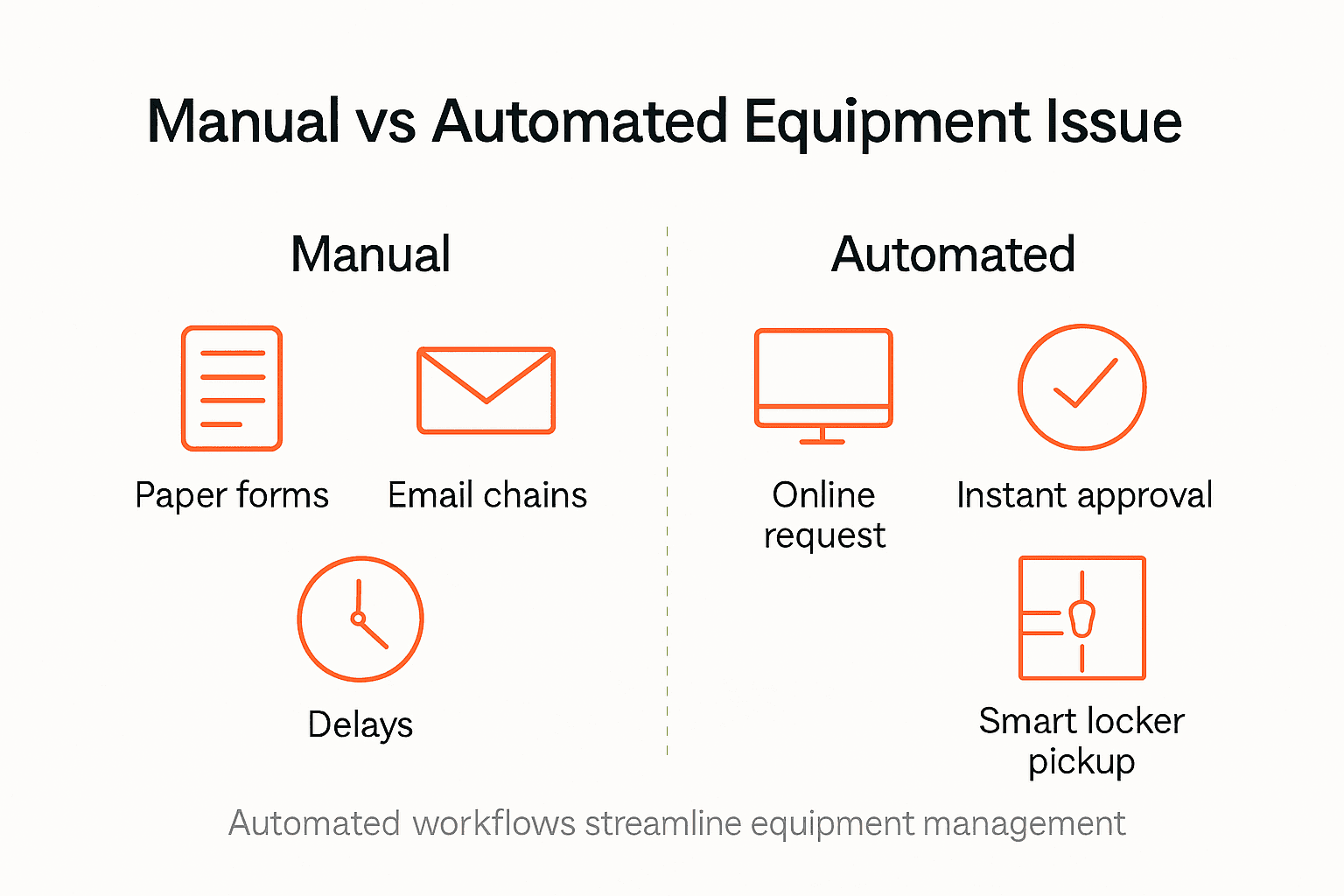
Compare core features of manual vs automated equipment management workflows:
| Attribute | Manual Processes | Automated Workflows |
|---|---|---|
| Approval Speed | Slow, prone to delays | Rapid, often instant |
| Asset Tracking | Inconsistent documentation | Real-time digital updates |
| Error Rate | Higher, human mistakes common | Low, system validation active |
| User Experience | Frustrating, unclear steps | Streamlined, transparent flow |
| Compliance Monitoring | Difficult to audit | Continuous, automated alerts |
Professional Tip: Create a comprehensive testing matrix that simulates various request scenarios to validate your workflow’s responsiveness and identify potential configuration gaps before full deployment.
Step 4: Deploy smart lockers and test issue automation
Deploying smart lockers and testing issue automation marks the critical final stage of transforming your equipment management strategy. This phase involves physically implementing your smart locker infrastructure and rigorously validating the automated workflows you have carefully designed.
Implement comprehensive testing protocols that simulate real-world equipment request and distribution scenarios. Your validation process should cover multiple authentication methods including barcode scanning, RFID verification, and user credential checks. Systematically test each potential user interaction pathway to ensure seamless equipment issuance, from initial request through to final collection. Verify that your notification systems function correctly, generating timely alerts for approvers, requestors, and IT support personnel throughout the entire transaction lifecycle.
Conduct staged deployment testing by initially rolling out smart lockers in a controlled environment such as a single department or geographic location. This approach allows you to identify and address any potential configuration issues before organisation wide implementation. Pay close attention to user experience metrics, system response times, and integration accuracy. Your goal is to create a robust, user friendly equipment distribution system that dramatically reduces manual administrative overhead while maintaining stringent security and compliance standards.
Professional Tip: Create a detailed incident tracking log during initial deployment to capture and quickly resolve any unexpected workflow interruptions or user experience challenges.
Step 5: Monitor transactions and validate end-to-end efficiency
Monitoring transactions and validating end-to-end efficiency represents the crucial ongoing phase of maintaining a sophisticated equipment management system. This process ensures your automated workflows continue to perform optimally, delivering consistent value across your organisation.
Leverage advanced process mining techniques to gain comprehensive visibility into your equipment issuance workflows. Implement detailed analytics dashboards that track key performance indicators such as transaction completion times, approval rates, user satisfaction metrics, and system response intervals. Systematically analyse these metrics to identify potential bottlenecks, inefficiencies, or areas requiring process refinement. Your monitoring strategy should focus on understanding the entire transaction lifecycle from initial equipment request through to final asset collection and return.
Establish a continuous improvement framework that allows for rapid iteration and optimization of your automated workflows. Configure automated alerts that trigger when performance metrics deviate from predefined benchmarks, enabling proactive management of potential systemic issues. Pay particular attention to user experience indicators, compliance adherence, and operational efficiency parameters. The goal is to create a dynamic, self-optimising system that consistently delivers exceptional equipment management performance while maintaining the highest standards of organisational effectiveness.
Professional Tip: Schedule quarterly comprehensive reviews of your transaction data to identify emerging patterns and opportunities for workflow enhancement.
Transform Your Equipment Issue Process with Velocity Smart Technology
Managing equipment issuance manually often leads to delays, compliance risks, and frustrating user experiences. This article highlights how automating equipment issue within ServiceNow can eliminate inefficiencies, accelerate approvals, and enhance asset tracking. If you are striving to implement seamless automated workflows, enforce strict governance, and reduce operational overhead, Velocity Smart Technology offers the perfect solution.
As the leading provider of ServiceNow-certified smart locker and vending solutions, our flagship product, Velocity Smart Collect, integrates natively with ServiceNow to automate equipment distribution securely and efficiently. By embedding directly into your ServiceNow instance, it removes GDPR concerns and unlocks the full potential of your existing workflows and approvals.
Ready to take control of your equipment management journey? Discover how Velocity Smart Technology can help you streamline approvals, improve compliance, and create an exceptional employee experience today. Learn more at Velocity Smart Technology and start modernising your IT and workplace support now.
Frequently Asked Questions
How can I assess my business needs for automating equipment issue in ServiceNow?
To assess your business needs, gather stakeholders from IT, human resources, and departmental leadership to document your requirements. Create clear guidelines for who can request equipment and define approval workflows to streamline your service delivery process.
What steps are involved in integrating Velocity Smart Collect with ServiceNow?
Integrating Velocity Smart Collect requires configuring the connection between it and your ServiceNow instance, ensuring that equipment requests and approvals are synchronised. Focus on mapping workflow processes to guarantee that each request triggers the appropriate authorisation checks and updates asset management records automatically.
How do I configure automated issuance workflows and approval rules in ServiceNow?
To configure automated workflows, outline the complete equipment request lifecycle in ServiceNow. Define approval hierarchies, develop granular rules based on user roles and compliance needs, and set up checks that validate request eligibility to ensure a seamless equipment distribution process.
What testing protocols should I implement when deploying smart lockers?
When deploying smart lockers, implement comprehensive testing protocols that simulate various equipment request scenarios. Validate each user interaction pathway, covering authentication methods like barcode scanning and RFID verification to ensure the issuance process runs smoothly.
How can I monitor transactions and ensure efficient equipment management?
You can monitor transactions by implementing detailed analytics dashboards that track key performance indicators such as transaction completion times and approval rates. Schedule quarterly reviews of your transaction data to identify patterns and enhance your workflows for ongoing improvement.