 Automated new starter laptop provisioning: 2026 guide">
Automated new starter laptop provisioning: 2026 guide
TL;DR:
- Automated laptop provisioning reduces setup time from hours to about 30 minutes by using zero-touch deployment technologies. It requires a proper infrastructure, including an MDM platform, hardware pre-registration, and an identity provider, to work effectively. Proper management of hardware hashes and integration with physical distribution methods are critical for reliable enterprise onboarding at scale.
Automated new starter laptop provisioning is the process of configuring and delivering a work-ready device to a new employee with minimal manual IT intervention, using zero-touch deployment technologies. The industry term for this approach is zero-touch provisioning, and it relies on three core components: a mobile device management platform such as Microsoft Intune or Jamf, an identity provider such as Microsoft Entra ID, and hardware hash pre-registration. The business case is clear. Zero-touch provisioning reduces laptop configuration time from four hours of manual effort to approximately 30 minutes of automated setup. For enterprises onboarding hundreds of new starters each month, that difference compounds into thousands of recovered IT hours annually. This guide covers the prerequisites, implementation steps, common failure points, and the broader ecosystem that takes automated device onboarding beyond first-day setup.
What does an automated new starter laptop deployment require?
Zero-touch provisioning does not work out of the box. It requires a specific infrastructure stack before a single device ships. Three components are mandatory: an MDM platform such as Microsoft Intune or Jamf, an identity provider such as Microsoft Entra ID, and hardware hash pre-registration for every device entering the fleet.
Licensing is the first gate. Microsoft 365 Business Premium, E3, or E5 licences all include Intune and Entra ID. Without the correct licence tier, the automated provisioning pipeline simply will not activate. Confirm licence assignments before ordering hardware.
Hardware selection matters as much as software. Windows Autopilot requires factory-fresh OEM Windows installations and will fail with custom images, which can also introduce security vulnerabilities. This rules out refurbished devices or machines rebuilt from corporate images unless they have been fully reset to factory state.
| Infrastructure component | Role in provisioning |
|---|---|
| Microsoft Intune or Jamf | MDM platform that pushes policies, apps, and configurations |
| Microsoft Entra ID | Identity provider managing user authentication and device join |
| Hardware hash pre-registration | Links physical device to deployment profile before first boot |
| Microsoft 365 E3/E5 or Business Premium | Licence tier unlocking Autopilot and Intune capabilities |
| Windows Autopilot | Orchestrates the zero-touch out-of-box experience |
Pro Tip: Upload hardware hashes to Intune before devices leave the supplier. If a device reaches a new starter before its hash is registered, the only recovery path is a full factory reset, which eliminates the time saving entirely.
How to implement an automated laptop provisioning workflow
A reliable automated laptop setup follows a defined sequence. Skipping steps or reordering them is the most common cause of deployment failures at scale.
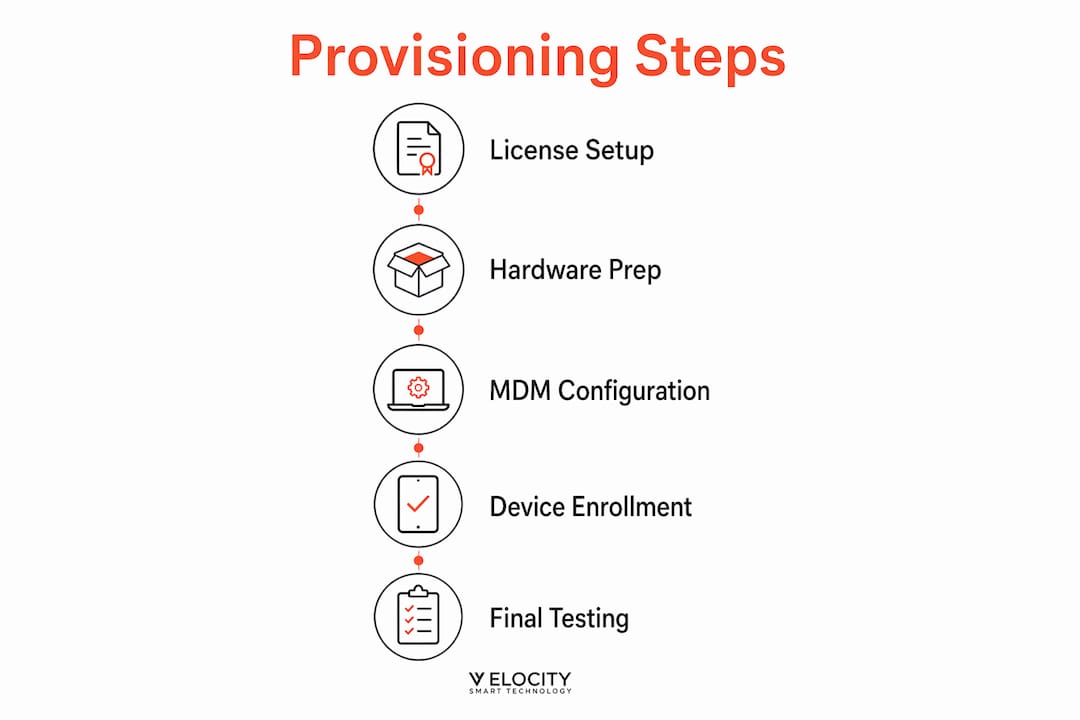
- Register hardware hashes. Export the hardware hash from each device using PowerShell or request the supplier to upload hashes directly to your Intune tenant via the Microsoft Partner Centre. This step must happen before any device is powered on by an end user.
- Create a deployment profile in Intune. Define the out-of-box experience settings: skip privacy screens, pre-join the device to Entra ID, and assign the profile to the device group containing your registered hashes.
- Configure the Enrollment Status Page (ESP). The ESP blocks desktop access until all critical applications and policies are installed, preventing partially configured devices from reaching users. Set a timeout that reflects your application payload size.
- Assign users to devices. Pre-assign the new starter’s Entra ID account to the device record in Intune. This removes the need for the user to enter credentials during setup and ensures the correct profile loads automatically.
- Trigger parallel onboarding tasks via Power Automate. Automated onboarding workflows can trigger 30 or more parallel tasks from a single HR form submission, including user creation in Entra ID, licence assignment, group membership, and equipment fulfilment. Power Automate connects the HR system to Intune and the service desk in one orchestrated flow.
- Validate the deployment profile. Test the full workflow on a spare device reset to factory state before the first live rollout. Confirm that all required applications install, policies apply, and the ESP clears within the expected window.
- Ship or stage the device. Once the profile is validated, devices can be shipped directly from the supplier to the new starter’s location. The user powers on the device, signs in with their corporate credentials, and Autopilot handles the rest.
This sequence applies whether you are provisioning ten devices per month or ten thousand. The architecture scales because the configuration lives in the cloud, not on the device.
Pro Tip: Run a full reset-and-redeploy test on at least two devices before any major onboarding cohort. Autopilot profiles can behave differently depending on network conditions, so test on both wired and wireless connections.

What are the common failures in automated laptop deployments?
The most frequent failure in a new laptop configuration pipeline is the missing hardware hash. Failing to upload the hardware hash before a user’s initial power-on forces a full device reset, turning a 30-minute automated setup back into a multi-hour manual recovery. The fix is procedural: make hash upload a supplier contractual requirement, not an IT afterthought.
Custom images are the second major risk. Enterprises that have relied on traditional imaging for years often attempt to apply existing images to Autopilot-enrolled devices. This breaks the zero-touch flow and, more critically, introduces configuration drift and potential security gaps that the MDM platform cannot audit.
Monitoring during deployment is non-negotiable. The Enrollment Status Page provides real-time visibility into which applications and policies have applied. IT teams should review ESP logs for every failed deployment rather than relying on user-reported issues, which typically arrive hours after the problem occurred.
Common failure points and how to address them:
- Hash not registered before first boot. Outcome: device bypasses Autopilot entirely. Fix: factory reset and re-register hash before reissuing.
- Custom image applied to device. Outcome: Autopilot profile fails to load. Fix: use only factory-fresh OEM Windows installs.
- ESP timeout set too low. Outcome: device appears ready before policies have applied. Fix: calculate timeout based on total application payload size, then add a 20% buffer.
- User pre-assignment missing. Outcome: generic profile loads instead of role-specific configuration. Fix: automate user-to-device assignment as part of the HR trigger workflow.
- Network proxy blocking MDM traffic. Outcome: device cannot reach Intune endpoints during setup. Fix: whitelist all required Microsoft Intune and Autopilot URLs at the network perimeter.
“Automation does not eliminate IT oversight. It transforms IT teams into architects of reliable workflows, improving consistency and freeing engineers to focus on exceptions rather than routine tasks.”
Automation shifts IT roles from manual device imaging to pipeline governance. The KPIs change accordingly: success is measured by deployment failure rate and time-to-productive, not by engineer hours spent per device.
How do enterprise platforms extend automated provisioning beyond setup?
Getting a laptop to a managed state is only the first stage of the device lifecycle. The broader challenge for large enterprises is distributing pre-configured devices at scale, across multiple sites and countries, without requiring an IT engineer at each location.
Modern asset lifecycle platforms enable deployment of pre-configured laptops in over 100 countries, with devices reaching a managed state within 20 minutes. That capability requires more than MDM. It requires physical distribution infrastructure that integrates with the provisioning workflow. Smart lockers connected to a ServiceNow-native platform, for example, allow a new starter to collect a fully provisioned device from a secure locker at their office without any IT involvement at the point of handover. The device handover process becomes a closed-loop ticket: the MDM confirms the device is ready, the locker releases it to the authenticated user, and the CMDB records the transfer automatically.
Automated software verification and patching during onboarding adds another layer of reliability. Platforms that orchestrate installation, verification, rebooting, and reporting reduce the risk of a device reaching a user with a failed application install that the ESP did not catch.
| Feature category | Entry-level provisioning tools | Enterprise lifecycle platforms |
|---|---|---|
| Device configuration | MDM profile push | MDM plus verified software installation and reporting |
| Physical distribution | Manual IT handover | Smart locker or kiosk with CMDB integration |
| Multi-country coverage | Limited by IT resource | Automated, 100+ country capable |
| Audit trail | MDM logs only | Full CMDB record including physical handover |
| Post-setup patching | Scheduled MDM policy | Continuous verification and remediation |
Velocity-smart’s Smart Collect platform sits at this intersection. It runs natively inside a customer’s ServiceNow tenant, meaning device handover events write directly to the CMDB as native records. There is no separate database and no manual reconciliation. For enterprises managing remote device management across distributed sites, that audit integrity is operationally significant.
Pro Tip: Combine your MDM provisioning pipeline with a smart locker system that integrates directly with ServiceNow. The locker handles physical handover, the MDM handles configuration, and the CMDB records both. New starters get a ready device; IT gets a complete audit trail with zero manual steps.
Key takeaways
Automated new starter laptop provisioning requires MDM infrastructure, hardware hash pre-registration, and physical distribution integration to deliver consistent, auditable device handovers at enterprise scale.
| Point | Details |
|---|---|
| Zero-touch cuts setup time | Automated provisioning reduces configuration from four hours to approximately 30 minutes per device. |
| Hash registration is critical | Upload hardware hashes before devices ship; missing this step forces a full factory reset. |
| ESP enforces compliance | The Enrollment Status Page blocks user access until all policies and apps are confirmed installed. |
| Physical distribution completes the loop | Smart lockers integrated with ServiceNow close the handover ticket without IT engineer involvement. |
| IT roles shift to pipeline governance | Automation moves IT focus from manual imaging to monitoring deployment reliability and failure rates. |
The part of laptop automation most IT teams get wrong
Having worked across enterprise IT deployments for many years, I find the same pattern repeating. Organisations invest heavily in the MDM configuration side of automated provisioning and then leave the physical handover entirely manual. A new starter’s laptop sits in a secure room, fully provisioned, waiting for an IT engineer to be available to hand it over. The automation stops at the device, not at the desk.
The consequence is predictable. The employee onboarding experience degrades at the final step, which is the one the new starter actually notices. They do not see the elegant Autopilot workflow. They see a two-hour wait on their first morning.
The enterprises that get this right treat provisioning and distribution as a single pipeline, not two separate workstreams. They connect their MDM platform to a physical distribution layer, whether that is smart lockers, a kiosk, or a proactive IT support service, and they measure success at the point the device reaches the user’s hands, not the point it leaves the IT room.
The other mistake I see consistently is treating automation as a one-time project. The provisioning pipeline needs the same governance as any other production system: failure rate monitoring, regular profile reviews, and a clear owner. When that ownership is unclear, profiles drift, hash registration steps get skipped under pressure, and the time savings erode quietly over months.
My view is that the IT teams who will lead on this in the next two years are those who position themselves as workflow architects rather than device technicians. The tools are mature. The gap is in operational discipline and end-to-end thinking.
— Anthony
How Velocity-smart supports enterprise device provisioning
Velocity-smart’s Smart Collect platform extends automated device onboarding into the physical layer, where most provisioning pipelines currently stop. Running natively inside ServiceNow, it connects MDM-ready devices to smart lockers, vending units, and IT support kiosks, so the handover event is as automated as the configuration that preceded it.
For enterprise IT teams managing new starter volumes across multiple sites, the Smart Collect platform closes the gap between a provisioned device and a productive employee. Customers including Roche, BAE Systems, and Northrop Grumman use it to handle device handovers, peripheral distribution, and walk-up support without dispatching an engineer. If your provisioning pipeline is solid but your physical distribution still depends on manual steps, IT self-service hardware is the logical next stage.
FAQ
What is zero-touch provisioning for laptops?
Zero-touch provisioning is an automated new starter laptop setup method that configures a device to a corporate-ready state without manual IT intervention. It uses an MDM platform, an identity provider, and hardware pre-registration to apply policies and applications automatically on first boot.
How long does automated laptop setup take?
Automated zero-touch provisioning reduces setup time from approximately four hours of manual effort to around 30 minutes per device. The exact duration depends on application payload size and network speed during the Enrollment Status Page phase.
What happens if a hardware hash is not registered before first use?
If a device is powered on by a user before its hardware hash is uploaded to the MDM platform, Autopilot cannot claim the device. The only recovery path is a full factory reset, which negates the time saving and requires manual IT involvement.
Does automated provisioning work for remote or international employees?
Enterprise lifecycle platforms can deploy pre-configured laptops across more than 100 countries, reaching a managed state within 20 minutes. Combining MDM provisioning with smart locker distribution removes the need for local IT presence at the point of handover.
How does the Enrollment Status Page protect device compliance?
The Enrollment Status Page blocks a user from accessing the desktop until all required applications and policies have successfully installed. This prevents partially configured devices from entering production use and reduces the risk of security policy gaps at first login.
Recommended
See what Smart Collect® could save you
Model your savings in two minutes, or book a 60-minute workshop to pressure-test the numbers against your estate.