 Service availability in IT: expert guide to maximising uptime">
Service availability in IT: expert guide to maximising uptime
TL;DR:
- Service availability is about delivering what the business contractually expects, not just keeping systems running.
- Achieving higher availability levels requires significant infrastructure, cost, and resilience investments aligned with business impact.
- Automation and error budgets optimize costs and improve recovery, shifting focus from fear-driven metrics to value-driven resilience.
Service availability is one of those concepts IT leaders talk about constantly, yet rarely question deeply enough. Most teams assume the goal is simply “as much uptime as possible,” but this thinking quietly drives over-engineering, budget waste, and misaligned priorities. Availability management in ITSM defines service availability as the ability of an IT service or configuration item to perform its agreed function when required. That word “agreed” is doing enormous work in that definition, and understanding it properly will change how you plan, invest, and report on your IT services.
Table of Contents
- What is service availability in IT?
- Key drivers of IT service availability
- Reactive and proactive availability management
- Balancing cost, business impact, and automation
- A fresh perspective: the uncomfortable truth about service availability
- Transforming service availability with smart automation
- Frequently asked questions
Key Takeaways
| Point | Details |
|---|---|
| Availability isn’t perfection | Striving for flawless uptime is costly; align targets with business needs for optimal results. |
| The key factors matter | Reliability, maintainability, serviceability, performance, and security shape your true service availability. |
| Balanced management wins | Combining proactive design and reactive monitoring is critical for effective IT service management. |
| Automation drives efficiency | Smart automation reduces errors and boosts response, supporting high-value uptime improvements. |
What is service availability in IT?
At its core, service availability is not about keeping lights on at all costs. It is about delivering what the business has contractually agreed to expect, consistently and reliably. That distinction matters enormously when you are responsible for IT across multiple sites, thousands of users, and complex service chains.
Availability is calculated as a percentage using this formula: (Agreed Service Time minus Downtime) divided by Agreed Service Time. So if a system is meant to be available for 720 hours a month and experiences 7.2 hours of downtime, its availability is 99%. Simple enough in theory. Far more complex to manage in practice.
This is where the “nines” benchmarking system becomes indispensable for IT planning. Each additional nine represents a dramatic reduction in permitted downtime:
| Availability target | Allowed downtime per year |
|---|---|
| 99% | ~3.65 days |
| 99.9% | ~8.76 hours |
| 99.99% | ~52.6 minutes |
| 99.999% | ~5.26 minutes |
As the reliability metrics data above shows, moving from 99.9% to 99.99% availability cuts your permitted annual downtime from nearly nine hours to under an hour. That single decimal point shift demands a fundamentally different infrastructure strategy, with real budget consequences.
Consider what these figures mean operationally:
- 99% is common for internal tools with moderate business impact
- 99.9% suits most enterprise applications across standard working hours
- 99.99% is typical for customer-facing financial or healthcare systems
- 99.999% is reserved for life-critical or revenue-critical infrastructure
The costs of IT inefficiency compound when teams chase a higher “nine” without a clear business case behind it. Every additional nine typically requires redundant systems, failover mechanisms, and dedicated monitoring, all of which consume engineering hours and capital budget. Understanding exactly where your services sit on this spectrum is the first step towards sensible availability planning.
Key insight: Your availability target should be driven by what failure costs the business, not by what is technically possible.
Key drivers of IT service availability
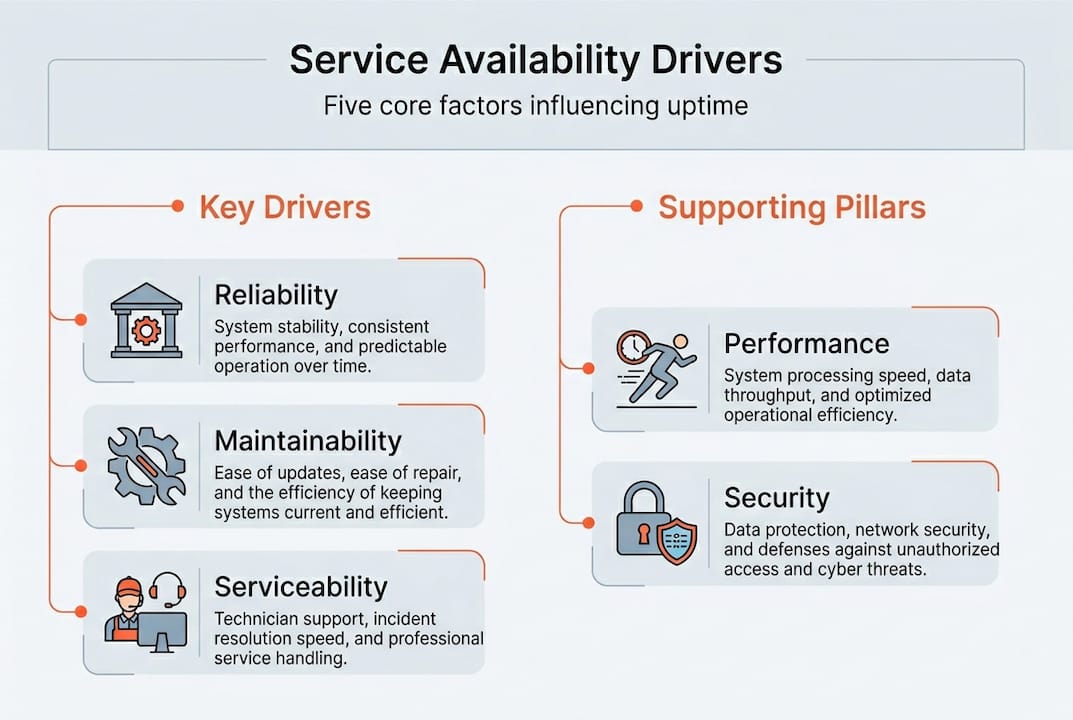
Measuring availability is one thing. Controlling it is another. Five core factors determine the availability you can realistically achieve: reliability, maintainability, serviceability, performance, and security.
Reliability refers to how long a service can operate without interruption. A highly reliable system fails infrequently. Think of this as the foundation. If your underlying infrastructure is fragile, no amount of clever recovery planning will sustain your availability targets.

Maintainability describes how quickly you can restore service after a failure occurs. Fast diagnosis, clear runbooks, and well-trained teams all feed into this factor. A system that fails rarely but takes four hours to recover may perform worse on availability than one that fails monthly but restores in minutes.
Serviceability is often underestimated. It covers the quality of support your suppliers and third parties can deliver. Poor supplier support creates a hidden vulnerability in your availability model. If a critical component depends on a vendor with a 48-hour SLA response time, that ceiling constrains your own availability target.
Performance and security act as supporting pillars. Degraded performance can constitute a form of unavailability, even if a system is technically online. Security incidents, particularly those causing service interruptions or data lockdowns, are an increasingly significant source of unplanned downtime.
These five factors do not operate in isolation. Here is how they compare in terms of where IT leaders typically have most control:
| Driver | Primary control lever | Common weakness |
|---|---|---|
| Reliability | Infrastructure design | Legacy systems |
| Maintainability | Process and tooling | Slow escalation paths |
| Serviceability | Supplier contracts | Weak SLA negotiation |
| Performance | Capacity planning | Reactive monitoring |
| Security | Policy and patching | Delayed threat response |
Strong IT asset management practices directly influence reliability and maintainability. When you know exactly what assets you have, where they are, and what condition they are in, you can predict failures before they occur rather than scrambling after them.
Pro Tip: Review your serviceability clauses in supplier contracts annually. A vendor’s support commitment that made sense three years ago may now be a genuine risk to your availability targets.
Reactive and proactive availability management
Examining the key drivers, leaders must also understand the strategic activities required to manage service availability. ITIL availability management divides these activities into two distinct modes, and both are essential.
ITIL availability management defines reactive activities as detecting, measuring, and reporting on unavailability as it occurs. Proactive activities, by contrast, focus on designing resilience into systems from the outset and testing those mechanisms before failure strikes in production.
Here is a practical breakdown of both modes:
- Monitor service and component availability continuously using automated tooling, not periodic manual checks
- Measure against agreed targets and capture trend data over time, not just incident-by-incident
- Report on availability performance transparently to both technical teams and business stakeholders
- Design for resilience from the start, incorporating redundancy, load balancing, and graceful degradation
- Test your recovery mechanisms regularly through planned exercises, not just when something goes wrong
The synergy between reactive and proactive approaches is where real availability gains live. Reactive monitoring without proactive design simply means you detect failures faster but cannot prevent them. Proactive design without ongoing reactive monitoring means you build resilient systems and then gradually lose visibility into whether they are actually performing as intended.
“The organisations that consistently meet availability targets are those that treat resilience as a design discipline, not a recovery afterthought.”
Proactive IT desk support automation plays a significant role here. When support processes are automated, the reactive burden on your team shrinks, freeing capacity for the proactive work that actually moves the needle on availability. The teams that succeed are those that use reactive insights to inform proactive improvements, creating a continuous feedback loop that steadily improves service reliability across the organisation.
Pro Tip: Set up automated availability reports that go directly to business unit leaders, not just your IT team. When the business sees uptime data, conversations about resourcing and investment become far easier to have.
Balancing cost, business impact, and automation
Once you have the framework, it is time to apply it responsibly, optimising for both cost and operational impact. The most common mistake IT leaders make is treating maximum availability as the default target without first asking what downtime actually costs the business in each specific context.
High availability is expensive to engineer and maintain. The correct approach is to negotiate availability targets based on the genuine business impact of failure, then design your architecture accordingly. A payroll processing system and an internal knowledge base do not need the same availability target, yet many organisations apply a uniform standard across their entire service portfolio.
Key principles for getting this balance right:
- Map services to business value before setting availability targets. Tier your services by the cost of failure, not by technical complexity
- Use SLAs to set external expectations and SLOs (Service Level Objectives) as your internal engineering targets, typically a fraction higher than the SLA to give yourself a safety margin
- Implement error budgets to manage this pragmatically. An error budget is simply the amount of downtime your SLO permits, and spending it wisely means making deliberate trade-offs rather than panicking at every minor incident
- Automate wherever the return justifies the investment, particularly for repetitive support tasks that currently absorb engineer time
Automation is a genuine force multiplier for availability. Smart vending and automated IT support solutions remove manual dependencies from your service chain, reducing the human error component of unplanned downtime. When devices can be exchanged, diagnosed, and replaced without waiting for a technician, you shorten your effective Mean Time to Restore significantly.
The costs of IT inefficiency are rarely obvious in the moment, but they accumulate fast. Avoiding over-provisioning through error budgets is not about accepting failure. It is about making deliberate, evidence-based decisions about where resilience spending delivers real returns.
Pro Tip: When building your availability business case, calculate the cost per hour of downtime for your top ten services. That single exercise usually reframes the entire investment conversation with your leadership team.
A fresh perspective: the uncomfortable truth about service availability
After years of enabling automated IT support across distributed organisations, the pattern we see most consistently is this: the teams chasing perfection are almost always the ones struggling most. Aiming for five nines when your business case supports three is not ambition. It is waste, disguised as diligence.
The error budget concept is genuinely liberating when teams embrace it properly. It shifts availability from a fear-driven metric to a managed resource. You stop treating every minor incident as a crisis and start asking smarter questions about where resilience investment actually creates value.
We have also seen how automation changes the calculus entirely. When smart lockers, vending machines, and IT support kiosks handle equipment distribution and first-line support automatically, the human-error variable shrinks considerably. The true cost of IT inefficiency is often not visible in your availability reports at all. It hides in the hours engineers spend on manual tasks that could, and should, be automated. The most forward-thinking IT leaders we work with have stopped measuring availability in isolation and started measuring it alongside the employee experience it enables.
Transforming service availability with smart automation
Improving service availability is not only about infrastructure investment. It is about removing the manual friction that creates hidden downtime and slows recovery.

Velocity Smart Technology’s automation solutions help IT leaders in large organisations tackle availability challenges at the operational level, automating device distribution, equipment exchange, and first-line support across multiple sites. Our Smart IT Support Kiosk enables employees to access diagnostics and device replacement without waiting for an onsite technician, directly reducing your Mean Time to Restore. If you are ready to see how intelligent automation can support your availability targets, explore how Velocity’s platform transforms the way your workforce accesses IT support.
Frequently asked questions
How is service availability calculated in IT?
Service availability is calculated as (Agreed Service Time minus Downtime) divided by Agreed Service Time, expressed as a percentage. The result tells you what proportion of the agreed window your service was actually operational.
What do ‘nines’ mean in availability benchmarks?
Each additional nine represents significantly less permitted downtime: 99% allows over 3.65 days of downtime per year, whilst 99.999% permits only around five minutes annually. The jump between each level demands increasingly complex and costly engineering.
How can automation improve service availability?
Automation reduces manual errors, speeds up recovery processes, and strengthens the proactive and reactive activities that underpin availability management. Automating repetitive support tasks frees your engineering team to focus on resilience design rather than incident response.
What are the risks of over-provisioning for high availability?
Over-provisioning availability drives costs up without a proportionate return. Using error budgets to align your targets with genuine business impact is a more sustainable approach than engineering for maximum uptime regardless of actual need.
Recommended
See what Smart Collect® could save you
Model your savings in two minutes, or book a 60-minute workshop to pressure-test the numbers against your estate.