 The role of PDF reporting in asset tracking">
The role of PDF reporting in asset tracking
TL;DR:
- PDF reporting in asset tracking creates immutable, reviewer-ready documents capturing asset events and audit histories for compliance and regulatory purposes. Its effectiveness depends on high-quality upstream logging and data reconciliation rather than report formatting, with automation tools enabling scalable, scheduled generation. Converting unstructured historic PDFs into structured datasets unlocks operational insights, emphasizing strategic data management and disciplined report design over technology.
PDF reporting in asset tracking is defined as the practice of generating structured, portable documents that capture asset events, ownership changes, and audit histories in a format that is immutable, reviewer-ready, and independent of the originating system. Where spreadsheets degrade and database exports require specialist access, a well-formed PDF report travels cleanly to auditors, finance teams, and regulators without losing its evidential integrity. The role of PDF reporting in asset tracking extends beyond simple record-keeping. It creates a defensible paper trail that supports compliance, accelerates regulatory responses, and gives asset managers a consistent view of what happened, when, and who authorised it. Tools such as iText7, Apache POI, and platforms like Shepherd CMMS and Oracle PeopleSoft have made this process increasingly automated and scalable for enterprise operations.
How does PDF reporting ensure asset data integrity and audit compliance?
PDF reports function as control artefacts, not merely formatted exports. Their primary value in asset tracking lies in packaging event-level audit logs into a form that auditors and finance teams can review without needing direct database access. Oracle PeopleSoft’s Financials Audit Framework demonstrates this clearly: the system logs each asset event with before-and-after field values, the user who triggered the change, and a timestamp, then surfaces these records through an audit log view accessible per asset. The PDF is the rendered output of that log, not a substitute for it.
The distinction matters because audit trail effectiveness depends on event-level logging with immutable evidence presentation, rather than on the PDF format itself. A PDF generated from a poorly configured audit log is no more defensible than a screenshot. The format only adds value when the upstream logging is complete and consistent.
Key asset events that well-designed PDF reports should capture include:
- Additions and acquisitions: date, cost centre, and approving user
- Transfers and location changes: originating and receiving custodian, with timestamps
- Depreciation postings: method applied, period, and calculated values before and after
- Maintenance and repair events: work order reference, technician, and outcome
- Retirements and disposals: authorisation chain, residual value, and disposal method
Shepherd CMMS takes a practical approach to this in regulated industries, using automated activity reports to generate clear compliance paper trails that reduce manual archival reconstruction during audits. The operational implication is direct: when an auditor requests evidence of an asset’s history, a pre-built PDF report cuts response time from days to minutes.
Pro Tip: Configure your asset management system to log every field-level change, not just status transitions. A PDF that shows only “transferred” without recording the originating custodian and authorising user will fail a detailed audit review.
What technical methods enable scalable, automated PDF reporting for asset tracking?
Generating a single PDF report manually is trivial. Generating hundreds of accurate, consistently formatted reports on a scheduled cadence across thousands of assets is an engineering problem. The performance characteristics of the generation pipeline determine whether PDF reporting remains a manual, ad hoc activity or becomes a reliable operational control.

Research prototypes using iText7 and Apache POI demonstrate that PDF generation at scale can process 10 asset records in approximately 1.8 seconds and 100 records in approximately 9.3 seconds, producing both PDF and Excel outputs with visual transformations applied. That benchmark is meaningful: it confirms that automated batch reporting for mid-sized asset registers is computationally feasible without specialist infrastructure.
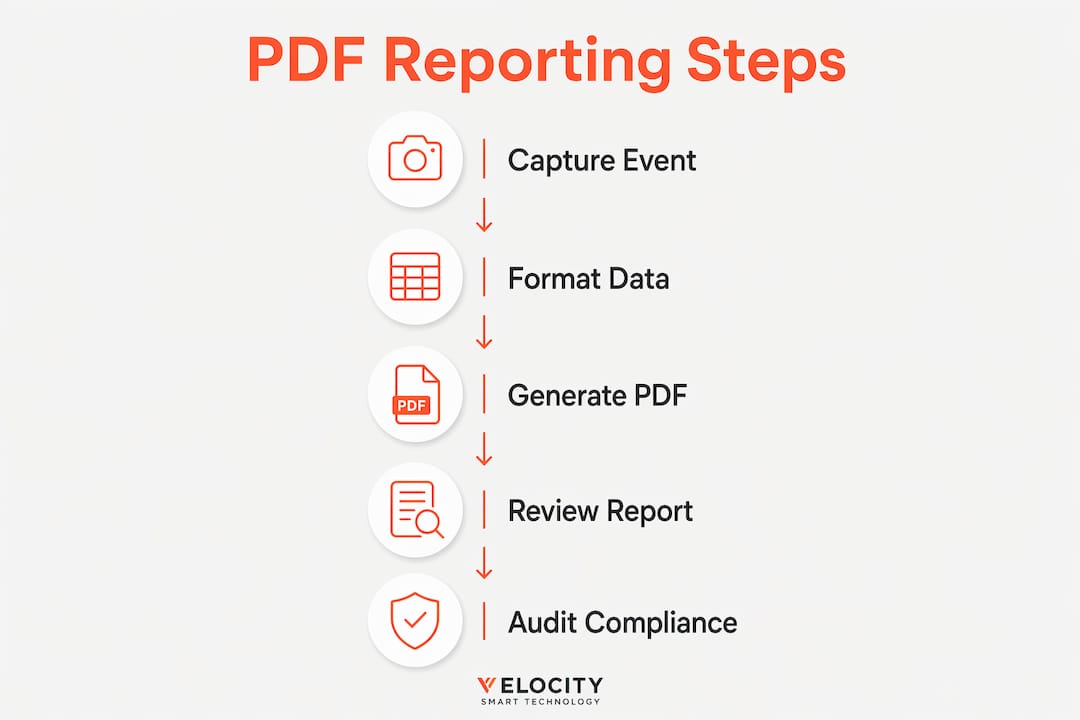
The following sequence describes a production-grade automated PDF reporting pipeline:
- Schedule the trigger. Define report cadence by asset class, cost centre, or compliance cycle. Monthly reports for depreciation; weekly for high-turnover consumables.
- Execute parallel read queries. Query a read-only replica of the production database to avoid locking. Parallel query execution using AWS RDS read replicas with Puppeteer, for example, drastically reduces generation time for chart-rich reports.
- Apply downsampling and memory management. For large image assets or embedded charts, downsample to 96 DPI for screen-review PDFs and 150 DPI for print. This controls file size without sacrificing readability.
- Generate one PDF per asset, then merge. Producing individual asset pages before merging into a consolidated document preserves layout control, particularly for barcode labels.
- Distribute automatically. Route completed reports to defined recipients via email or deposit them into a document management system on completion.
The table below summarises the key technical choices and their trade-offs:
| Approach | Best suited for | Key trade-off |
|---|---|---|
| iText7 templating | High-volume, structured asset registers | Requires Java or .NET environment |
| Apache POI with PDF export | Mixed PDF and Excel output requirements | Larger memory footprint at scale |
| Puppeteer with HTML templates | Chart-rich, visually formatted reports | Headless browser dependency |
| SAP ABAP with Adobe Forms | SAP-native asset management environments | Vendor lock-in to SAP ecosystem |
Pro Tip: Performance bottlenecks in automated PDF reporting arise from data extraction and reconciliation, not from rendering. Invest in optimising your database queries and data preparation steps before tuning the PDF generation library itself.
How do PDF reports transform unstructured asset documents into actionable data?
Not all PDF documentation in asset management originates from a reporting system. A significant proportion exists as historical invoices, delivery notes, and procurement records that were never designed for querying. The challenge for asset managers is converting this static evidence into structured data that supports operational decisions.
The OXXO case, documented by Laserfiche, illustrates the scale of this problem and its solution. OXXO processed over 100,000 fixed-asset invoices stored as PDFs, extracting structured line-item data and linking each invoice to an asset identifier. The result was a shift from manual PDF searches to database queries, enabling asset location by serial number, store reference, or fiscal ID in seconds rather than hours. That operational shift is the practical definition of PDF documentation in asset management working at scale.
The benefits of this conversion approach include:
- Faster asset location: Query by any identifier rather than opening individual files
- Improved reconciliation: Match invoice data against CMDB records to identify discrepancies
- Audit readiness: Link financial documentation directly to asset lifecycle events
- Reduced dependency on institutional knowledge: Any team member can retrieve asset history without knowing where a specific file was saved
The limitation worth acknowledging is that extracted data is only as reliable as the extraction process. Optical character recognition errors, inconsistent invoice formats, and missing fields all introduce noise into the resulting dataset. PDF documentation should be treated as evidence packaging, not as a system of record. The authoritative record lives in the asset management system; the PDF provides the supporting evidence that makes that record defensible.
For organisations building a centralised asset tracking capability, the practical recommendation is to extract and ingest historical PDF documentation into the CMDB or asset register as a one-time migration, then maintain forward-looking records natively in the system.
What are best practices for designing and using PDF reports in asset tracking?
Effective PDF reporting for inventory control and asset management requires discipline at three levels: data quality, report design, and distribution governance. Most failures in PDF-based audit trails trace back to one of these three areas rather than to the PDF generation technology itself.
The foundational principle is that report trustworthiness depends entirely on upstream data quality, reconciliation discipline, and repeatable close processes. FundCount’s analysis of asset management reporting quality makes this explicit: a report generated from inconsistent or unreconciled data is not merely unhelpful, it is actively misleading to the auditors and finance teams who rely on it.
On report design, the SAP ABAP approach to barcode label generation offers a transferable lesson. Generating one PDF per asset before merging into a consolidated document reduces barcode payload size by 60 to 70 per cent, which directly improves scan reliability in physical asset tracking environments. The principle applies beyond barcodes: controlling layout at the individual asset level before aggregation prevents the formatting errors that make merged reports unreliable.
Best practices for PDF report design and governance:
- Treat PDFs as rendered views, not primary records. The audit log in your asset management system is authoritative. The PDF is the presentation layer.
- Automate generation on a fixed schedule. Ad hoc reports introduce inconsistency. Scheduled generation tied to accounting periods or compliance cycles maintains comparability.
- Compress barcode payloads. Oversized barcodes in asset label PDFs fail to scan reliably in warehouse and data centre environments. Test scan success rates before deploying at scale.
- Version-control report templates. A template change mid-year creates inconsistency in audit trails. Manage templates with the same rigour as software releases.
- Validate data before generation. Run reconciliation checks against the CMDB before triggering batch PDF generation. A report produced from unreconciled data wastes reviewer time and erodes confidence.
Pro Tip: When designing asset label PDFs, print a test batch of 20 labels and scan each one with the actual hardware your warehouse team uses before approving the template for production. Barcode sizing issues that appear minor on screen frequently cause scan failures at scale.
Key takeaways
PDF reporting adds the most value in asset tracking when it renders immutable, event-level audit logs into reviewer-ready documents, rather than functioning as a standalone record-keeping format.
| Point | Details |
|---|---|
| PDFs as evidence packaging | Treat PDF reports as rendered views of audit logs, not as authoritative records in their own right. |
| Automation at scale | Tools like iText7 and Puppeteer with parallel query execution make scheduled batch reporting operationally feasible. |
| Data quality is the constraint | Report trustworthiness depends on upstream reconciliation discipline, not on the PDF generation technology. |
| Structured extraction unlocks value | Converting historical PDF documentation into queryable datasets, as OXXO demonstrated, transforms static evidence into operational intelligence. |
| Label design discipline | Generating one PDF per asset before merging, with compressed barcode payloads, prevents scan failures in physical tracking environments. |
Why PDF reporting deserves more strategic attention than it typically receives
Most asset management teams I encounter treat PDF reporting as an output problem. They focus on formatting, branding, and delivery cadence, and assume the hard work is done once the report looks right. In my experience, that framing misses the point entirely.
The real leverage in PDF reporting comes from what happens before the PDF is generated. If your audit logging configuration in Oracle PeopleSoft or your equivalent system is incomplete, if your reconciliation process runs monthly instead of weekly, or if your asset events are logged at the status level rather than the field level, then no amount of PDF design work will produce a defensible audit trail. The PDF is a window. What matters is what it looks out onto.
I have also seen organisations invest significantly in PDF extraction and data conversion projects, only to discover that the extracted data requires as much manual validation as the original PDFs. The OXXO case is genuinely impressive, but it succeeded because the underlying invoice data was structured and consistent. Organisations with messier historical documentation need to budget for data cleansing as part of the extraction project, not as an afterthought.
The area where I see the most untapped potential is automated scheduling. Most enterprise asset management teams still generate compliance reports manually, on request, which means they are always reactive. Building a scheduled PDF generation pipeline, even a simple one using AWS SES for distribution, shifts the team from reactive to proactive. Auditors receive reports before they ask for them. Finance teams have depreciation summaries before the period close. That shift in posture is worth more than any improvement in report formatting. For IT asset managers specifically, integrating PDF reporting into IT asset management workflows is where the operational gains compound most quickly.
— Anthony
How Velocity-smart supports automated asset reporting

Velocity-smart’s Automation Unboxed platform is built for enterprise IT teams that need asset data to move as fast as the workflows that depend on it. By running natively inside ServiceNow, Velocity-smart ensures that every asset event, device handover, and inventory transaction is logged as a native CMDB record, queryable and reportable without data synchronisation delays or parallel databases. That architecture is the foundation that makes reliable PDF reporting possible: the audit log is always current, always reconciled, and always accessible. For teams managing physical device distribution at scale, the Smart Collect platform connects physical handover events directly to ServiceNow workflows, giving asset managers the upstream data quality that trustworthy PDF reports require.
FAQ
What is the role of PDF reporting in asset tracking?
PDF reporting in asset tracking produces immutable, reviewer-ready documents that capture asset events, ownership changes, and audit histories. These reports support compliance, accelerate regulatory responses, and provide a consistent evidential record for auditors and finance teams.
How does PDF reporting support audit compliance?
PDF reports package event-level audit logs, including before-and-after field values and user actions, into a format that auditors can review without direct database access. Oracle PeopleSoft’s audit logging framework demonstrates this approach, generating defensible activity histories per asset.
What tools are used to generate PDF reports for asset tracking?
iText7, Apache POI, Puppeteer, and SAP ABAP with Adobe Forms are the most widely used tools for automated PDF generation in asset management environments. Each suits different infrastructure contexts, from Java-based enterprise systems to SAP-native environments.
Can PDF documents be converted into structured asset data?
Yes. Laserfiche’s work with OXXO demonstrates that over 100,000 historical fixed-asset invoices stored as PDFs can be extracted into queryable datasets, enabling asset location by serial number or fiscal ID within seconds rather than hours.
What is the most common failure point in PDF-based asset reporting?
The most common failure is poor upstream data quality. FundCount’s analysis confirms that PDF reports are only as trustworthy as the underlying asset management workflows and reconciliation discipline. Formatting and delivery are secondary concerns.
Recommended
See what Smart Collect® could save you
Model your savings in two minutes, or book a 60-minute workshop to pressure-test the numbers against your estate.