
Audit Ready: ServiceNow Native Automated Checklists for IT Handovers
An automated checklist in IT is a sequenced set of verification steps, run natively inside a platform like ServiceNow, that governs a physical device handover — pick-up, swap, or return — and automatically updates the configuration item (CI) and asset records as each step completes. It replaces a paper form or spreadsheet with a task-driven workflow that preserves chain of custody. Smart Collect® from Velocity-smart is a working example: every locker or vending transaction closes a ServiceNow task and writes directly to the CMDB.
TL;DR:
- Automated checklists require strict device tagging, ownership discipline, and consistent inventory practices to function reliably and avoid workflow failures.
- They enforce sequence by updating the CMDB directly from verification steps, which improves audit accuracy and reduces manual reconciliation errors.
- The most common failure modes stem from unstandardized manual processes and mismatched asset tags, not technical limitations.
- Native tenant integration ensures real-time data updates and immutable audit logs, which are critical for regulated industries’ compliance.
- Tools like Smart Collect® exemplify how physical device handovers can be seamlessly automated within ServiceNow, achieving significant throughput and staffing efficiency gains.
Table of Contents
- What does an automated checklist look like inside a ServiceNow tenant?
- How do automated checklists run through a device handover workflow?
- What operational benefits and KPIs should CIOs expect?
- What are the prerequisites and common failure modes?
- What fields and steps belong in a device swap checklist?
- Why does audit and compliance depend on tenant-native checklists?
- How have automated checklists in IT evolved?
- What types of automated checklists exist beyond device handovers?
- How do automated checklists compare with manual checklists and generic tools?
- What technologies actually power automated checklists?
- Where else do automated checklists apply across IT operations?
- What best practices keep automated checklists reliable?
- What lessons matter most for platform owners right now?
- How does Smart Collect® put automated checklists into practice?
- Sources
What does an automated checklist look like inside a ServiceNow tenant?
Strip away the marketing language and an automated checklist is a data structure. Each item is a discrete, sequenced verification step tied to a task record, and that task record links to an asset and a CI in ServiceNow’s asset and configuration tables. The checklist doesn’t exist as a separate document. It exists as state, held inside records the platform already governs.
ServiceNow Hardware Asset Management (HAM) treats the CMDB as the single source of truth, so when a checklist step completes (a device scanned, a serial number matched, a return confirmed) the workflow updates the CI and asset record automatically rather than waiting for someone to key it in later. Now Assist and the broader asset workspace sit on top of that same structure, surfacing checklist status, flagging exceptions, and letting agents verify models or stock levels before a task is allowed to close.
Verification events that a well-built checklist must capture include:
- Asset tag and serial number confirmation against the CI record.
- Identity of the person collecting, returning, or receiving the device.
- Condition assessment (damage, missing accessories, factory reset status).
- Timestamp and location of the transaction.
- Disposition outcome (deployed, returned to stock, flagged for repair, retired).
Miss any of these and the checklist becomes a formality rather than an audit trail. The point of running it inside the tenant, rather than in a spreadsheet bolted on afterwards, is that every one of those data points lands in a record you can query, report on, and defend during an audit.
How do automated checklists run through a device handover workflow?
A checklist doesn’t start itself. Something triggers it, and that something is usually one of four sources: a self-service portal request, an incident ticket, a change record, or a field service dispatch. From there, the flow follows a fairly consistent pattern across pick-up, swap, return, and refresh scenarios.
- Trigger. A new starter request, a broken-laptop incident, or a scheduled refresh initiates a fulfilment task in ServiceNow.
- Stock and fulfilment decision. The system checks available inventory and decides the fulfilment path, whether that’s shipping a unit, routing it through a smart locker, dispensing from vending, or scheduling local pickup, leveraging insights from AI Inventory Software to optimize stock management.
- Handover execution. The employee or technician completes the physical exchange, and the checklist captures asset ID, condition, and identity verification at the point of collection.
- Verification and closure. Each checklist item completes a corresponding task; completing the final task closes the parent record and updates the CI.
Zero Touch Refresh is the clearest illustration of this pattern in ServiceNow’s own documentation. It coordinates tasks like “Request shipment,” “Ready for pickup,” and “Receive return asset” as a chain, where completing one triggers the next, and in many scenarios removes the need to hold local stockroom inventory at all. Asset lifecycle automation follows the same logic more broadly: a sequenced task structure of verify, schedule, receive, and close, where each completion automatically updates the CI and asset record without a human re-entering data.
Agentic workflows push this further. Now Assist for HAM can verify a device model against stock, trigger the fulfilment task, and close it once conditions are met, cutting the manual steps that used to sit between request and resolution. Today, that still tends to end where the physical device begins. Confirming the item is physically in someone’s hands remains the step that requires an engineer or a purpose-built handover point.
What operational benefits and KPIs should CIOs expect?
The case for automated checklists is measurable, not aspirational. Five KPIs matter most: throughput (transactions completed per period), fulfilment time (request to device-in-hand), downtime avoided, travel reduced for support staff, and IT staff hours recovered from manual tracking and chasing.
Documented outcomes from Smart Collect® deployments: a global pharmaceutical customer recorded a 500%+ uplift in IT service throughput and 83% faster fulfilment; a US nuclear energy operator cut on-site tickets by 60% and reclaimed 31–42% of IT staff time; a US aerospace and defence customer reduced staff travel by 35% across more than 34 sites.
These figures were achieved under traditional ITSM workflows, before agentic AI was driving the process end-to-end. As Now Assist and similar tools mature and start orchestrating more of the request-to-fulfilment chain autonomously, these numbers represent a floor rather than a ceiling.
Beyond throughput, checklist-driven verification has a quieter but equally valuable effect: it improves CMDB accuracy. Every scanned asset tag and confirmed serial number is a data point that would otherwise depend on someone updating a spreadsheet correctly and on time. ITAM platform documentation frames this as uniting CMDB, procurement, and contract data into one governed view, which matters most during an audit, when the question isn’t “do we have a policy” but “can you show me the record for this specific device on this specific date.”
Track these outcomes alongside your baseline:
- Average fulfilment time, request to confirmed handover.
- Percentage of handovers completed without a support engineer travelling on-site.
- CMDB record accuracy rate against physical spot-checks.
- Staff hours no longer spent chasing manual returns.
What are the prerequisites and common failure modes?
Automated checklists fail for boring reasons, not technical ones. The ServiceNow community’s own implementation guidance is blunt about it: inconsistent device tagging and weak inventory discipline break automated workflows before they even start. If a device’s asset tag doesn’t match its CI record, no amount of workflow logic will close that task cleanly.
Three prerequisites tend to separate successful rollouts from stalled ones: a documented tagging standard applied to every asset class, a clear ownership matrix defining who is accountable for each device state, and CMDB discipline that treats the configuration database as the system of record rather than a reporting afterthought.
The most common failure mode is sequencing: teams try to automate a process that was never standardised manually, and the automation simply scales the mess. ServiceNow’s own maturity guidance recommends a crawl, walk, run sequence: standardise manual stockroom and tagging procedures first, automate the routine paths second, and reserve agentic exception handling for the cases that genuinely need judgement.
- Standardise tagging and ownership before writing a single workflow rule.
- Automate the high-volume, low-variance handovers first (standard laptop swaps, peripheral requests).
- Reserve agentic exception handling for damaged, missing, or mismatched-serial cases.
Pro Tip: *Run a two-week tagging audit on your highest-volume device category before you automate anything.
What fields and steps belong in a device swap checklist?
A workable checklist template for a locker pickup or device swap needs a small number of fields, each earning its place by supporting either verification or audit.
- Asset tag and serial number — matched against the CI record before the transaction is allowed to proceed.
- Verifier identity — the employee or technician’s authenticated ID, captured automatically rather than typed in.
- Timestamp and location — the exact moment and site of collection, feeding both SLA reporting and audit trail.
- Condition assessment — a simple pass/fail or graded input covering physical damage and accessory completeness.
- Disposition outcome — deployed, returned to stock, flagged for repair, or escalated as an exception.
Each of these fields should translate directly into task-closure logic: completing the condition check closes the “verify” task, which triggers the CI update, which in turn closes the parent record. Where a mismatch occurs (wrong serial, damaged unit), the exception should route to a human resolver rather than silently closing the task, a distinction worth building into the workflow from day one rather than retrofitting after the first bad handover slips through. A related resource on IT hardware management checklists walks through how these fields map onto HAM’s own data model in more detail.
Why does audit and compliance depend on tenant-native checklists?
Every sync between systems is a place where a record can drift, and drift is exactly what an auditor will find. Running checklists natively inside the ServiceNow tenant, rather than through a third-party system that syncs data back periodically, closes that gap because there’s no reconciliation step to fail.
- No middleware layer means no sync lag between a physical handover and its CI update.
- RBAC inherited from the existing tenant controls who can view, edit, or close a handover record.
- Immutable audit logs timestamp every verification step against the employee, asset, and location involved.
- Retention policies follow the organisation’s existing ServiceNow configuration rather than a separate vendor’s schedule.
For regulated industries, this matters beyond convenience. A pharmaceutical or defence organisation operating under ISO 9001 and ISO 27001 obligations needs to demonstrate exactly who handled a specific device and when, without producing evidence from two disconnected systems. A tenant-native design ties every handover verification to a single audit record and a single CI change, which is precisely the design principle that reduces the reconciliation burden during a compliance review.
How have automated checklists in IT evolved?
Checklists in IT operations started as literal paper forms clipped to a delivery box: sign here, confirm the serial number, file it in a drawer. The first digital shift came with spreadsheet-based asset registers in the 1990s and early 2000s, which improved searchability but did nothing to prevent stale or duplicated data, since updates depended entirely on someone remembering to type them in.
The real inflection point came with ITSM platforms consolidating asset, incident, and change data into a single database. Once CMDB architecture matured, checklists stopped being documents and became workflow states. A task couldn’t close until its prerequisite step had a recorded value, which turned the checklist from a compliance artefact into an enforcement mechanism.
The current phase layers AI on top of that workflow foundation. Now Assist and similar agentic tools can verify stock availability, confirm a device model matches a request, and close routine fulfilment tasks without a human touching them. What hasn’t moved, at least not yet, is the physical step: an engineer or a purpose-built handover point still needs to confirm the device is genuinely in the requester’s hands. That’s the layer where checklist automation is now concentrating, because it’s the last one standing between a fully autonomous request and a fully autonomous fulfilment.
What types of automated checklists exist beyond device handovers?
Device handover is the most visible use of automated checklists, but it’s one category among several running inside a mature ServiceNow tenant. Understanding the range helps platform owners spot patterns they can reuse rather than building each workflow from scratch.
Change management checklists verify that approval, testing, and rollback steps complete in sequence before a change record can close, preventing unauthorised production changes from slipping through.
Onboarding and offboarding checklists coordinate identity provisioning, hardware assignment, and access revocation across HR and IT systems, often spanning multiple departments and systems of record.
Patch and vulnerability checklists confirm that a patch has been tested, deployed, and validated against a device population before the associated task closes, which matters enormously when a failed patch can take down a production system.
Compliance attestation checklists walk teams through recurring regulatory requirements, capturing evidence at each step rather than relying on an annual scramble to reconstruct a paper trail.
Disposal and decommissioning checklists verify data wiping, asset deregistration, and disposal certification before a device leaves the CMDB entirely. This category deserves particular care in regulated environments, and a dedicated secure asset disposal guide covers the verification sequence in more depth.
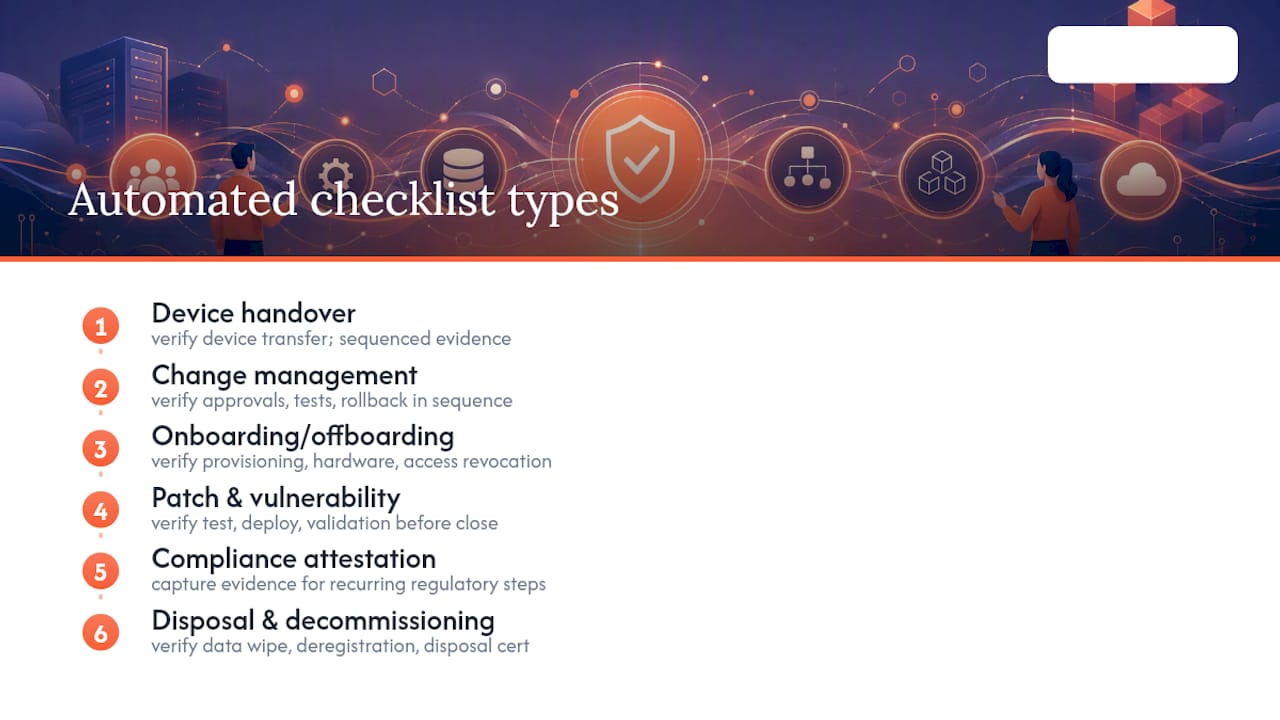
What unites all of these is the same underlying mechanic described earlier: a sequenced task chain, tied to records, that won’t close without evidence.
How do automated checklists compare with manual checklists and generic tools?
A manual checklist, whether it’s a paper form or a spreadsheet tab, records intent. Someone decided a step should happen and wrote it down. It does not, on its own, verify that the step actually happened correctly, and it creates no link between that record and the systems that depend on it being accurate.
An automated checklist, by contrast, enforces sequence. A task cannot close until its prerequisite data exists, and that data writes directly to the CI or asset record rather than sitting in a separate file waiting for someone to reconcile it later. This is the structural difference that matters most for audit readiness: a manual checklist is evidence that a process was designed; an automated one is evidence that it was followed.
Generic task-automation tools sit somewhere in between. They can auto-complete steps and route approvals, but unless they’re built on the same data model as the asset and configuration records they’re meant to update, they still require a sync or export step to reconcile with the CMDB. That sync step is exactly where drift creeps in, and it’s the gap a tenant-native design is built to avoid.
| Approach | Enforces sequence | Writes to CMDB natively | Audit trail |
|---|---|---|---|
| Paper or spreadsheet checklist | No | No | Manual, easily lost |
| Generic task-automation tool | Partially | Usually requires sync | Depends on integration |
| ServiceNow-native automated checklist | Yes | Yes | Immutable, tenant record |
The practical takeaway for a platform owner evaluating tools isn’t which one has the most features. It’s which one avoids creating a second source of truth that someone eventually has to reconcile against the first.
What technologies actually power automated checklists?
Underneath the workflow diagrams, automated checklists depend on a handful of concrete technical building blocks. Workflow engines, the core of platforms like ServiceNow, define the sequence of states a task can move through and the conditions required to advance from one to the next.
APIs connect that workflow engine to the systems that hold real-world data: inventory counts, employee directories, and increasingly, hardware endpoints like lockers and vending units that report a physical event back into the tenant the moment it happens. Without that API layer, a “verification” step is just a checkbox someone can tick without evidence.
Scripting, typically JavaScript-based business rules within ServiceNow, handles the conditional logic between steps: routing an exception to a human resolver when a serial number mismatches, or auto-closing a task when every required field is populated correctly.
Increasingly, AI agents sit on top of this stack, performing verification steps that previously required a person to review and confirm manually. An agent can check that a returned device’s model matches its assignment record, for instance, and mark that portion of the checklist complete without waiting for a technician’s sign-off. What no software layer replaces, at least for now, is the physical confirmation that a device changed hands, which is why hardware endpoints capable of reporting that event directly into the workflow are becoming a necessary complement to the software stack, not a separate concern from it.
Where else do automated checklists apply across IT operations?
Device handovers get most of the attention because they’re visible and disruptive when they fail, but the same checklist logic runs quietly through several other high-frequency IT processes.
Incident management uses automated checklists to enforce triage steps, confirming severity classification, notifying stakeholders, and gathering diagnostic data before an incident can be escalated or closed. This prevents the common failure of an incident being marked resolved before the root cause is actually confirmed.
Patch deployment checklists verify a patch has passed testing, been scheduled within a change window, and validated post-deployment against a sample of affected devices, catching failed rollouts before they cascade.
Access provisioning checklists confirm identity verification, manager approval, and system-specific access grants happen in the correct order, which matters for compliance frameworks that require evidence of segregation of duties.
Vendor onboarding checklists coordinate security assessments, contract sign-off, and system integration steps across procurement and IT security teams, often the slowest-moving process in an enterprise if left to manual chasing.
Each of these shares the same architecture as a device handover checklist: sequenced tasks, mandatory data capture, and a record that updates automatically when the sequence completes. Enterprises that build one well-governed checklist framework tend to find it easier to apply the same pattern to the next process, rather than reinventing the logic each time.
What best practices keep automated checklists reliable?
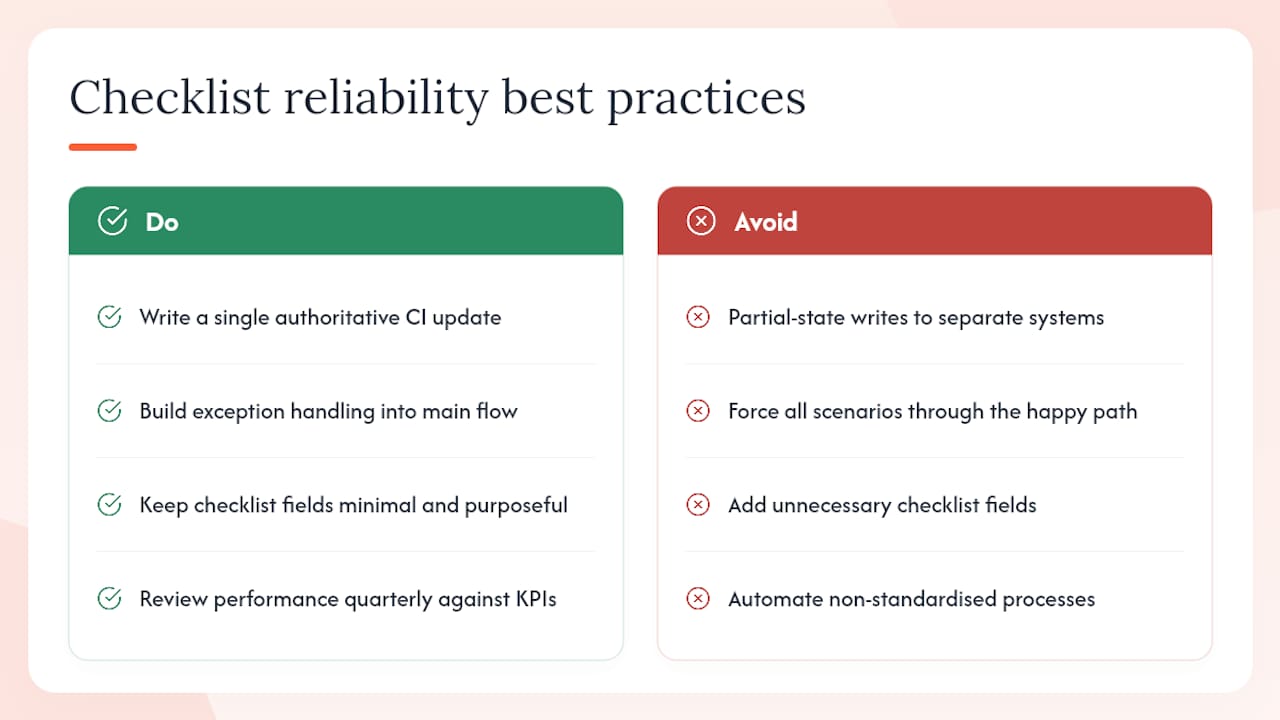
Design checklists so each verification step writes a single, authoritative update to the CI or asset record, and avoid architectures where partial state gets written to separate systems requiring reconciliation later. That single design principle prevents the majority of data-integrity problems platform owners encounter after go-live.
Build exception handling into the main flow from the start, not as an afterthought. A short failure branch, covering damaged, missing, or mismatched-serial cases, should route straight to a human resolver while the rest of the flow continues fully automated. Trying to force every scenario through the happy path is a common cause of checklists that technically work but frustrate the people using them.
Keep checklist fields minimal and purposeful. Every field you add is a field someone has to complete correctly, and unnecessary fields slow down the transaction without adding audit value. Asset tag, verifier identity, timestamp, condition, and disposition cover most handover scenarios without bloat.
Review checklist performance quarterly against the KPIs that matter: fulfilment time, exception rate, and CMDB accuracy against physical spot-checks. A checklist that worked well at launch can drift out of alignment as device types, locations, or staffing change, and the only way to catch that early is to keep measuring it.
Finally, resist automating a process that was never standardised manually. If your tagging and ownership discipline isn’t consistent today, fix that first. Automation scales whatever process you feed it, good or bad.
What lessons matter most for platform owners right now?
The gap between what’s automated today and what’s genuinely possible is narrower on paper than it feels in practice. ServiceNow’s workflow engine, HAM’s CMDB discipline, and Now Assist’s agentic verification handle the digital half of a device handover extremely well. The physical half, someone confirming a device actually changed hands, has lagged behind because it required a person, a form, and a filing cabinet’s worth of trust.
Smart Collect® customer outcomes give a useful baseline for what’s achievable even before agentic AI drives the full workflow: significant throughput improvements, substantial ticket reduction, and notable travel reductions all happened under conventional ITSM processes. As Now Assist matures, these numbers are a starting point, not a ceiling.
If you’re evaluating your own checklist maturity, start narrow: audit your tagging standard on one device category, then pilot a locker-based or Zero Touch Refresh flow before rolling out broadly.
— Anthony
How does Smart Collect® put automated checklists into practice?
If you’ve read this far, you’ve seen how automated checklists depend on sequenced tasks that write cleanly to the CMDB without a reconciliation step. Smart Collect® is built to close exactly that gap on the physical side of the handover. It runs as a certified application inside your existing ServiceNow tenant, not as a bolt-on integration, so every locker or vending transaction maps directly to a task record, updates the CI automatically, and inherits your existing RBAC and audit configuration.
That native design is why regulated enterprises use it: ISO 9001 and ISO 27001 certification, no middleware layer between the physical event and the CMDB, and a channel ecosystem of ServiceNow Service Specialist Partners who already understand how it fits into an existing tenant. Documented outcomes, including the 500%+ throughput uplift and 60% ticket reduction referenced earlier, were achieved under this exact architecture.
If you’re assessing procurement options, look for three signals: native tenancy rather than a synced integration, recognised security certifications, and a partner ecosystem that can support deployment across multiple sites. You can review how the platform maps checklist steps to tasks and CIs in detail, or explore the broader self-service hardware fulfilment model it’s built on to see where it fits your own device distribution strategy.
Sources
Recommended
See what Smart Collect® could save you
Model your savings in two minutes, or book a 60-minute workshop to pressure-test the numbers against your estate.