UI path automation explained for enterprise IT leaders
In this guide, “UI path automation” means ServiceNow-native automation for physical device handovers — the platform layer that closes locker, vending, and kiosk tickets inside your Now tenant without dispatching an engineer. This is not a discussion of UiPath robotic process automation software. The audience here is enterprise CIOs and IT operations leaders evaluating how to automate physical handovers, scale distributed IT support, and integrate hardware workflows natively into ServiceNow.
- Definition: ServiceNow-native physical handover automation runs inside the customer’s Now tenant, updates the CMDB as a native record, and inherits existing RBAC and audit controls.
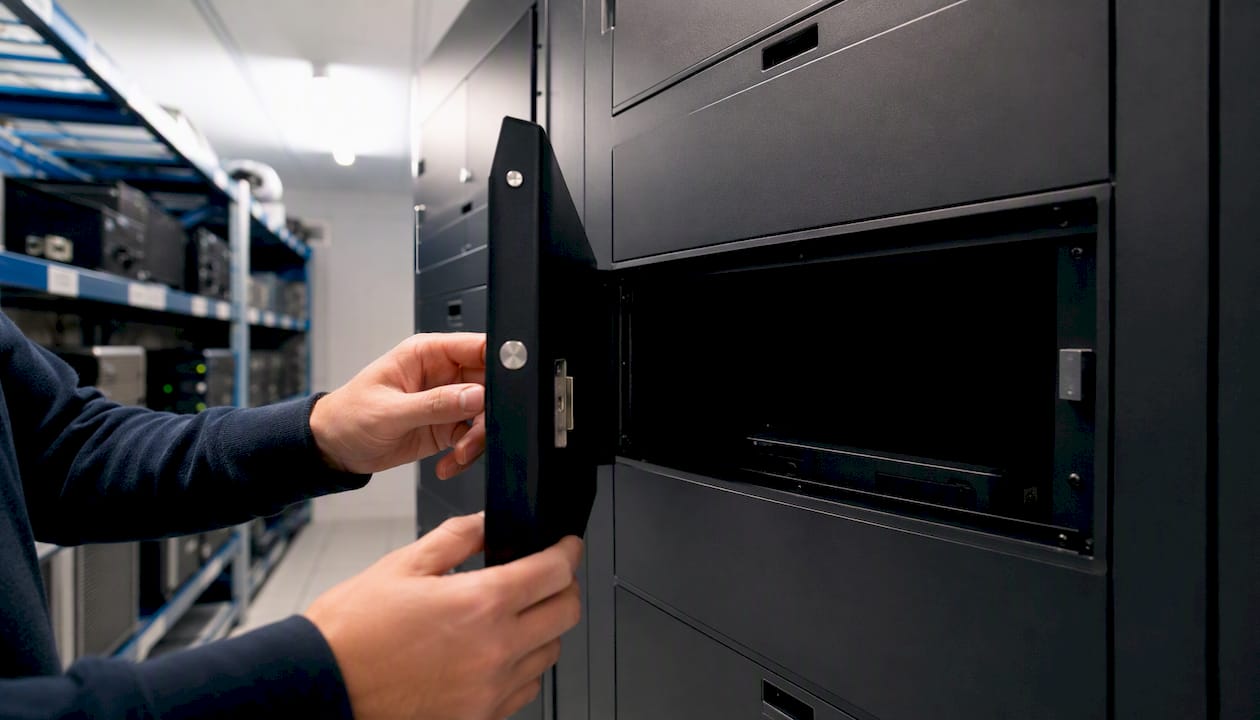
- Core form factors: Smart Lockers (full-device handovers), Smart Vending (peripherals and consumables on demand), Smart Kiosk™ (walk-up support, automated).
- Platform signals: no parallel database, no middleware layer, no separate security review — asset state, location, and ownership history sit in the CMDB like any other configuration item.
ServiceNow Hardware Asset Management uses the CMDB as a single source of truth, with AI agents and workflows positioned to reduce manual processes and improve inventory accuracy across the full asset lifecycle.
Key takeaways
ServiceNow-native physical handover automation closes the gap that digital automation cannot reach: the physical device transaction that still requires a human when no hardware endpoint exists inside the Now tenant.
| Point | Details |
|---|---|
| Validate tenancy first | Confirm Hardware Asset Management licence, stockroom mapping, and vendor cloud tenancy before any configuration begins. |
| CMDB hygiene is the critical path | Orphaned CIs and unmapped stockrooms cause go-live failures; audit and resolve them in week one of the pilot. |
| Measure three KPIs from day one | Track fulfilment time, IT staff hours recovered, and CMDB record accuracy to build the scale business case. |
| Zero Touch Refresh requires vendor alignment | Direct-ship automation only works when the provider is on the same ServiceNow cloud or connected via Service Exchange. |
| Smart Collect® delivers results before AI drives the workflow | 500%+ throughput and 83% faster fulfilment were achieved on standard ITSM workflows; agentic AI raises the ceiling further. |
Table of Contents
- How does ServiceNow-native physical handover automation work?
- What business outcomes can you expect from device handover automation?
- UK deployment checklist: tenancy, security, and vendor readiness
- How should you govern handover automation at scale?
- Your 90-day pilot-to-scale playbook
- How does UiPath RPA differ from ServiceNow-native physical automation?
- Where does UiPath RPA apply beyond physical handover?
- What tools does UiPath Studio provide for RPA development?
- What are the fundamental concepts behind UiPath automation?
- How does UiPath automation work at a technical level?
- Why ServiceNow-native physical automation is the strategic priority in 2026
- Smart Collect® fits your pilot from day one
- Sources
How does ServiceNow-native physical handover automation work?
The Now tenant acts as the control plane. Hardware form factors — lockers, vending units, kiosks — are edge nodes that receive instructions from ServiceNow workflows and report state back to the CMDB. There is no external orchestration layer.
The operational flow follows a predictable sequence: a service catalogue request triggers an asset task; the workflow engine checks stockroom mapping and either reserves a local unit or initiates a shipment record; on fulfilment, the CI record updates automatically. Asset lifecycle automation in ServiceNow covers every status transition from request through procurement, transfer, deployment, and disposal, with workflows completing tasks and updating CI records without manual intervention.
For distributed workforces, Zero Touch Refresh extends this model: an external provider ships a replacement device directly to an employee or a remote stockroom. Shipment records, tracking numbers, and asset-assignment tasks are created automatically on despatch. The critical prerequisite is that the provider and customer must be on the same ServiceNow cloud, or connected via Service Exchange.
| Integration point | What happens automatically |
|---|---|
| Catalogue request submitted | Asset task created; stockroom mapping checked |
| Stockroom unit reserved | Locker or vending slot assigned; employee notified |
| Shipment despatched (Zero Touch) | Shipment record created; tracking number logged; asset assigned |
| Device collected or received | CI record updated; task closed; CMDB reflects new owner |
| Device returned or retired | Disposal order triggered; audit trail updated |
Security posture is inherited, not replicated. RBAC roles, audit logs, and data residency rules from the customer’s tenant apply to every hardware transaction. There is no vendor-side database to review or synchronise.
Pro Tip: Map your stockroom locations in ServiceNow before configuration begins. Missing stockroom mapping is the most common cause of workflow failures at go-live, and it takes minutes to fix in design but hours to diagnose in production.
What business outcomes can you expect from device handover automation?
The primary KPIs worth tracking are: IT service throughput (transactions per hour), fulfilment time (request to collection), employee downtime per incident, IT staff time recovered, and CMDB record accuracy. Each maps directly to a workflow decision — stockroom versus direct ship, locker versus vending, attended versus unattended kiosk.
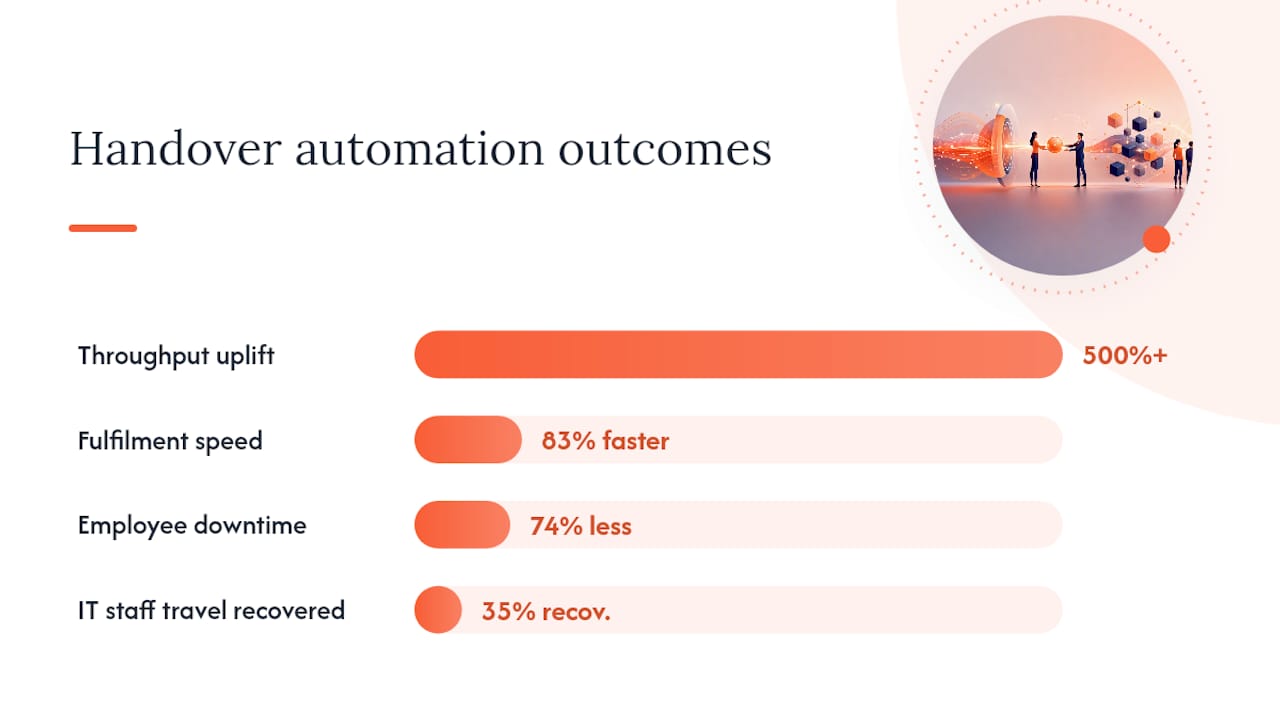
Outcomes delivered by Smart Collect® before agentic AI was driving the workflow give a credible baseline. A global pharma customer recorded significant uplift in IT service throughput, materially faster fulfilment, and substantially less employee downtime. These figures reflect traditional ITSM workflows; as Now Assist matures, they represent a floor rather than a ceiling.
- Throughput: measure transactions processed per locker bank or vending unit per day; compare against pre-automation walk-up or desk-side volumes.
- Fulfilment time: track request-to-collection time in ServiceNow; target sub-30-minute fulfilment for stocked items.
- Staff time: log engineer hours diverted from physical handovers to higher-value work; a US aerospace customer recovered 35% of IT staff travel across 34+ sites.
- CMDB accuracy: run a discovery reconciliation report before and after deployment; automated lifecycle workflows eliminate the manual update gap that degrades record quality over time.
500%+ throughput uplift, 83% faster fulfilment, 74% less employee downtime — outcomes a global pharma customer achieved with Smart Collect® running on standard ITSM workflows, before AI-driven orchestration.
Direct-ship models reduce local inventory overhead but require vendor integration for serial numbers and shipment records to flow into the Hardware Asset Workspace. That integration is the practical differentiator between a working pilot and a production-scale roll-out.
UK deployment checklist: tenancy, security, and vendor readiness
A structured pre-deployment review prevents the configuration errors that stall pilots. Work through these steps before committing to a go-live date.
- Confirm ServiceNow tenancy model. Verify the customer’s Now instance version, active Hardware Asset Management licence, and Service Exchange configuration. Zero Touch Refresh requires the vendor to be on the same ServiceNow cloud or connected via Service Exchange.
- Audit CMDB hygiene. Run a discovery reconciliation to identify orphaned CIs, missing serial numbers, and unmapped stockrooms. Stockroom mapping and asset action validation system properties are common configuration errors — document them early.
- Validate ISO 27001 controls. Confirm data residency, encryption at rest, and network segmentation for locker and vending hardware. Velocity-smart is ISO 27001 certified; verify that physical device placement meets your organisation’s security zoning policy.
- Confirm vendor cloud tenancy. For Zero Touch Refresh, obtain written confirmation from the hardware provider that they operate on the same ServiceNow cloud or have an active Service Exchange connection.
- Configure stockroom and label workflows. Define stockroom locations, serial number capture processes, and email notification triggers before testing begins.
- Establish closure events. Map every collection, return, and disposal event to a CI/asset record update so the CMDB stays current without manual intervention.
- Review UK asset disposal obligations. Confirm WEEE compliance and secure data-erasure processes are embedded in the disposal order workflow. The audit trail in ServiceNow provides the evidential record regulators expect.
Pro Tip: Engage your ServiceNow Service Specialist Partner — such as Atos, DXC, SCC, or Vohkus — during CMDB hygiene rather than after. Dirty data discovered at integration testing adds weeks to a pilot timeline.
For a detailed IT hardware management checklist covering procurement alignment and stockroom configuration, the Velocity-smart 2026 guide maps directly to these prerequisites.
How should you govern handover automation at scale?
Governance at scale requires clear role assignment and documented policy checks. A working RACI for most enterprise deployments looks like this:
- Stockroom managers: own physical unit configuration, label printing, and first-line hardware fault reporting.
- Service desk: own catalogue request quality, task escalation, and employee communication.
- Asset owners / IT operations: own CMDB record accuracy, stockroom mapping, and disposal order initiation.
- Procurement: own vendor contracts, Service Exchange agreements, and serial number data feeds.
- ServiceNow partner: owns application configuration, release alignment, and system property documentation.
Policy checks worth embedding in the runbook: asset action validation on incidents and change requests (system property controlled); change request behaviour for high-value assets; disposal order task sequence including data erasure confirmation before CI retirement.
The single-platform approach — managing hardware in the same place as software and cloud assets — keeps the CMDB as the genuine source of truth and makes workflows far less brittle than point-tool integrations that require constant data translation.
Red flags that indicate poor data hygiene or misconfiguration: stockroom locations returning null on asset task creation; CI records showing “in stock” for devices physically in use; parallel spreadsheets maintained by stockroom managers alongside ServiceNow records; disposal orders closing without a data-erasure task completing first.
Your 90-day pilot-to-scale playbook
Define pilot scope before week one: choose one or two locations, one device class (laptops or peripherals), and one fulfilment model (stockroom or direct ship). Success criteria should be agreed with the business sponsor before configuration begins.
For automating asset approval workflows that feed into this pilot structure, the Velocity-smart blog covers request-to-task automation in detail.
How does UiPath RPA differ from ServiceNow-native physical automation?
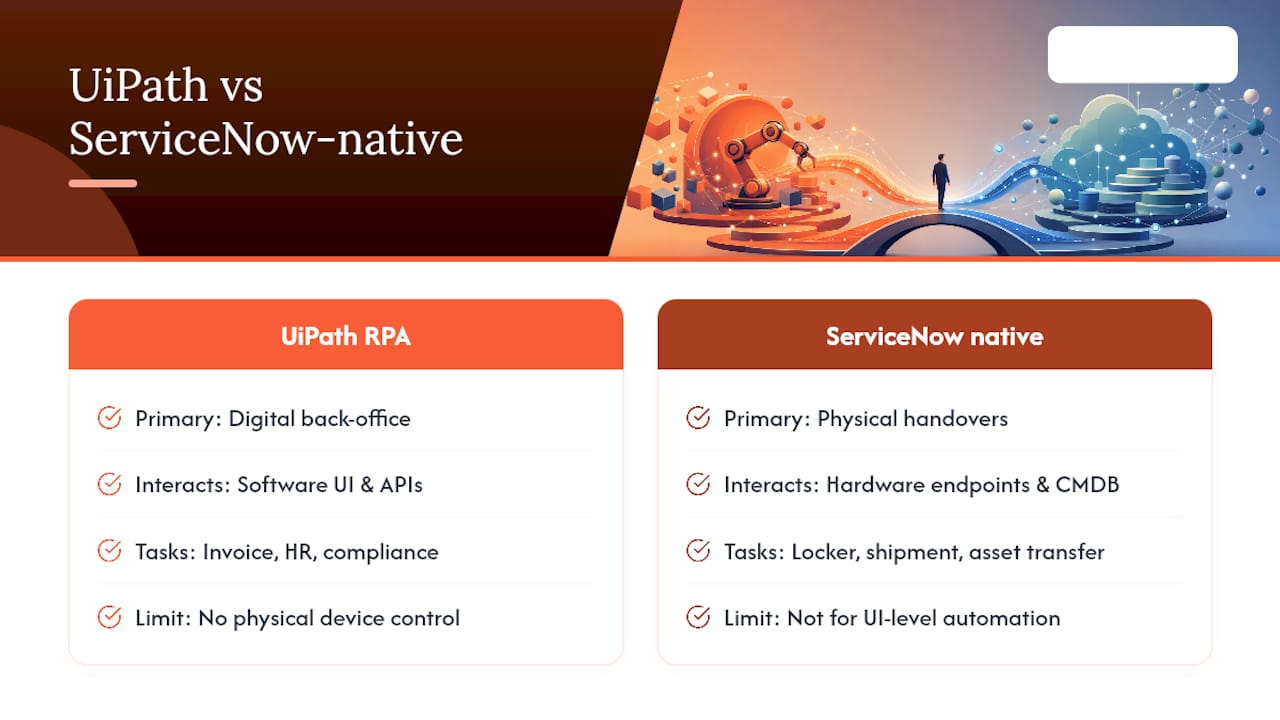
UiPath is a robotic process automation platform. It automates digital workflows by mimicking user interactions with software interfaces — reading screens, entering data, moving files, and triggering API calls across applications. Its primary domain is back-office process automation: invoice processing, HR onboarding data entry, compliance reporting, and similar high-volume, rules-based digital tasks.
ServiceNow-native physical handover automation solves a different problem entirely. The workflow does not end at a screen; it ends at a physical device changing hands. The CMDB record, the locker door, the shipment label, and the employee notification are all part of one transaction. No RPA bot can open a locker door or verify a serial number against a physical asset. The automation layer must extend to hardware endpoints, and it must do so inside the same data model that governs the rest of the IT estate.
The practical implication for CIOs: UiPath and ServiceNow-native physical automation are not competing choices for the same problem. RPA addresses digital process gaps; Now-native hardware automation addresses the physical handover gap that digital automation cannot reach. Many enterprises run both, with business process automation covering the digital layer and ServiceNow Hardware Asset Management covering the physical one.
Where does UiPath RPA apply beyond physical handover?
UiPath’s strongest enterprise use cases sit in processes where data moves between systems that lack native integration. Common applications include: accounts payable automation (extracting invoice data and posting to ERP); IT service management data entry (syncing tickets between legacy systems and ServiceNow); HR onboarding (populating Active Directory, payroll, and access management systems from a single intake form); and compliance reporting (aggregating data from multiple sources into a structured audit output).
In regulated industries — pharma, financial services, utilities — UiPath is frequently deployed to automate audit trail generation and regulatory submission preparation, where the volume of structured data tasks makes manual processing impractical. These are digital workflows with no physical component.
What tools does UiPath Studio provide for RPA development?
UiPath Studio is the integrated development environment for building automation workflows. It provides a visual drag-and-drop designer where developers map process steps as activities, connect them with control flow logic, and configure selectors that identify UI elements on target applications.
Key tools within the UiPath platform include UiPath Orchestrator (centralised deployment, scheduling, and monitoring of bots), UiPath Assistant (the desktop interface through which attended bots are triggered by users), and UiPath Document Understanding (AI-assisted extraction from unstructured documents such as invoices and contracts). The platform also includes a testing framework for validating automation reliability before production deployment.
What are the fundamental concepts behind UiPath automation?
UiPath automation is built on four core concepts. Bots (software robots) execute process steps either attended (triggered by a user) or unattended (scheduled or event-driven). Workflows define the sequence of activities a bot performs, structured as sequences, flowcharts, or state machines depending on process complexity. Triggers initiate workflow execution based on a schedule, a queue item, an API call, or a user action. Orchestrator is the server-side control plane that manages bot deployment, monitors execution, handles queues, and stores credentials securely.
These concepts map cleanly to enterprise governance requirements: Orchestrator provides the audit trail, role-based access, and centralised logging that compliance teams need. Bots can be assigned to specific machines or virtual environments, and execution logs are retained for review.
How does UiPath automation work at a technical level?
UiPath bots interact with target applications through three primary mechanisms. UI automation uses selectors — XML-based identifiers — to locate and interact with specific elements in a desktop or web application, replicating mouse clicks and keyboard input. Screen scraping extracts text and data from application interfaces that lack APIs, using optical character recognition or native text extraction depending on the application type. API integration connects directly to application endpoints where available, bypassing the UI layer entirely for greater reliability and speed.
For enterprise deployments, API integration is preferred wherever the target system exposes a stable endpoint, because selector-based UI automation is sensitive to application updates that change element identifiers. A well-designed UiPath workflow combines API calls for structured data exchange with UI automation only where no API exists, reducing maintenance overhead significantly.
Why ServiceNow-native physical automation is the strategic priority in 2026
The consolidation argument is straightforward. Every point tool added to the IT estate creates a data translation requirement: fields must be mapped, records must be synchronised, and discrepancies must be resolved. Over time, those translations become the primary source of CMDB inaccuracy. A Now-native approach eliminates the translation layer entirely because hardware transactions use the same data model as every other IT record.
Distributed workforces have made this architectural choice urgent rather than optional. When employees are spread across offices, remote sites, and home locations, the physical handover problem scales faster than the service desk can absorb. Direct-ship models via Zero Touch Refresh reduce the dependency on local stockrooms, but they require vendor integration discipline that only a Now-native platform can enforce without a parallel database.
CIOs should watch three developments closely: tenant governance as agentic AI agents begin writing to the CMDB directly, AI-driven data normalisation that can repair historical CMDB inaccuracies at scale, and the partner ecosystem’s readiness to co-deliver physical automation alongside digital transformation programmes. The enterprises that establish clean CMDB foundations now will extract disproportionate value from Now Assist as it matures.
Smart Collect® fits your pilot from day one
Smart Collect® runs natively inside your ServiceNow tenant: smart lockers, Smart Vending, and Smart Kiosk™ all managed from one platform, with asset state written directly to your CMDB and no parallel database to maintain.
Velocity-smart is a UK-headquartered ServiceNow Service Specialist Partner, ISO 9001 and ISO 27001 certified, with deployments across regulated industries including pharma, energy, defence, and financial services. For UK pilots, the Smart Locker Whitepaper covers technical prerequisites, stockroom configuration, and deployment timelines in detail. To discuss a pilot scoped to your tenant and locations, request a demo via Smart Collect®.
Sources
- Asset life-cycle automation
Recommended
See what Smart Collect® could save you
Model your savings in two minutes, or book a 60-minute workshop to pressure-test the numbers against your estate.