
Boost service desk efficiency: pro guide for IT leaders
TL;DR:
- Manual processes and lack of automation cause support delays and employee dissatisfaction in large enterprises.
- Effective automation requires thorough assessment, stakeholder engagement, and continuous improvement for meaningful results.
Overwhelmed service desk teams, spiralling ticket backlogs, and employees waiting hours for a replacement laptop are not edge cases in large enterprises. They are daily realities. When your IT support operation is stretched across multiple sites and hundreds or thousands of users, manual processes compound every delay and erode the employee experience you’ve worked hard to build. This guide walks you through a structured approach to transforming service desk efficiency: from honestly assessing where you stand today, through preparing for automation, executing a phased rollout, and validating measurable results that your board will actually care about.
Table of Contents
- Assessing current service desk efficiency
- Preparing for automation: key requirements and best practices
- Implementing automation: step-by-step enterprise guide
- Validating impact and continuous improvement
- Why most enterprise IT teams underuse automation and what actually works
- Accelerate your service desk transformation with the right partner
- Frequently asked questions
Key Takeaways
| Point | Details |
|---|---|
| Pinpoint inefficiencies | Evaluate current service desk operations using meaningful metrics to identify where improvements are most needed. |
| Lay solid foundations | Ensure your infrastructure, leadership alignment, and workflow mapping are in place before automating. |
| Automate with a plan | Roll out automation step by step, focusing first on high-volume repetitive tasks for maximum impact. |
| Measure and refine | Regularly assess automation impact with key performance indicators and seek ongoing improvements. |
Assessing current service desk efficiency
Before making transformative changes, it is crucial to understand the current state of your service desk operations. You cannot fix what you have not properly measured, and in large enterprises, the gap between perceived performance and actual performance is often startling.
Start by pulling data on the metrics that matter most. Inefficiency in IT support leads to increased operational costs and lost productivity, yet many IT leaders are still relying on anecdotal evidence rather than hard numbers to make resourcing decisions. That needs to change.
The most common sources of inefficiency in distributed enterprise environments include:
- Manual ticket triage that forces agents to re-read, re-categorise, and re-route the same types of requests every single day
- Inconsistent processes across sites, meaning a request handled in London takes twice as long as the same request handled in Manchester
- Lack of self-service options, which pushes every minor issue through the same queue as critical incidents
- Poor asset visibility, so technicians spend time locating equipment rather than resolving problems
Use this table to benchmark your current service desk performance and identify where your biggest gaps lie:
| Metric | Industry benchmark | Common enterprise reality | Priority level |
|---|---|---|---|
| Average first response time | Under 1 hour | 3 to 6 hours | High |
| Ticket backlog (rolling 7 days) | Under 50 | 200 or more | High |
| Employee satisfaction score | Above 85% | 60 to 70% | Medium |
| First contact resolution rate | Above 70% | 45 to 55% | High |
| Mean time to resolution | Under 4 hours | 12 to 24 hours | Medium |
Once you have your numbers, look for patterns. If first contact resolution is low, your agents may lack access to the right knowledge base articles at the point of triage. If your backlog is growing week on week, volume is outpacing capacity and automation is the only scalable answer. Exploring customer support automation ideas at this stage can give you a useful external perspective on where other organisations are finding quick wins.
Pro Tip: Set up automated reporting dashboards before you make any changes. This gives you a clean baseline to compare against post-automation and makes your ROI case far more compelling when presenting to senior stakeholders.
Preparing for automation: key requirements and best practices
Once you have pinpointed inefficiencies and opportunities, the next step is to carefully prepare your foundation for automation. Rushing into tooling without this groundwork is the single biggest reason enterprise automation projects stall or fail outright.

Automating help desk functions requires prerequisite system readiness and management buy-in. Both are non-negotiable. Without integrated workflows and leadership commitment, even the best automation platform will deliver disappointing results.
The core components your enterprise needs before automation can succeed are:
- Digital workflows that are documented, consistent, and not dependent on individual tribal knowledge
- Clear escalation paths so automated systems know exactly when to hand off to a human agent
- An integrated knowledge base that is current, searchable, and connected to your ticketing platform
- A unified asset management system so automation has accurate, real-time data to work with
Here is a direct comparison of where traditional service desks fall short versus what a well-designed automated service desk delivers:
| Feature | Traditional service desk | Automated service desk |
|---|---|---|
| Ticket triage | Manual, agent-dependent | Rule-based or AI-driven routing |
| Hardware requests | Email or phone, manual fulfilment | Self-service portal with smart locker collection |
| Reporting | Weekly manual reports | Real-time dashboards |
| Availability | Business hours only | 24/7 self-service capability |
| Scalability | Limited by headcount | Scales with demand |
| Cost per ticket | High | Significantly reduced |
Before you go live with any automation, work through this readiness checklist:
- [ ] All key workflows are documented and agreed upon by stakeholders
- [ ] Your ITSM platform (such as ServiceNow) is configured and up to date
- [ ] Data quality in your CMDB and asset register is verified
- [ ] IT leadership and HR have aligned on change management communications
- [ ] End users have been consulted and their pain points have been captured
- [ ] A pilot group has been identified for initial testing
Reviewing AI automation workflow improvements can help you understand how intelligent routing and automated triage fit into your broader workflow design. The goal of proactive IT desk automation is to shift your team from reactive firefighting to anticipating and resolving issues before employees even raise a ticket.
Pro Tip: Involve end users from multiple sites and roles in your discovery phase. The frontline employee in a warehouse has very different service desk needs from a finance analyst in head office. Capturing both perspectives will surface workflow pain points that your IT team would never have identified on their own.
Implementing automation: step-by-step enterprise guide
With solid preparation complete, you are ready to move to hands-on execution of your automation strategy. This is where the planning pays off, provided you follow a structured approach rather than trying to automate everything at once.
Follow these steps to implement service desk automation effectively across your enterprise:
- Define measurable goals. Set specific targets: reduce average resolution time by 40%, cut ticket backlog by 50% within 90 days. Vague objectives produce vague results.
- Map your highest-volume processes. Identify the ten request types that account for the majority of your ticket volume. Password resets, hardware requests, and software access approvals are typically top of the list.
- Select automation tools aligned to your platform. If you are on ServiceNow, choose solutions that are natively certified on that platform to avoid integration risk and data governance complications.
- Configure and test in a sandbox environment. Never go live without thorough testing. Simulate real user scenarios and edge cases before touching production.
- Pilot with a controlled group. Roll out to one site or one department first. Gather feedback aggressively during this phase. What works in theory often needs adjustment in practice.
- Review and refine before scaling. Use the pilot data to adjust routing rules, escalation triggers, and knowledge base content. Only then should you expand to the wider organisation.
- Optimise continuously. Automation is not a set-and-forget exercise. Schedule monthly reviews of automation performance and update rules as your organisation evolves.
Steps to successful IT support automation in the enterprise sector consistently point to one lesson: the organisations that succeed treat automation as a programme of continuous improvement, not a one-time project. Understanding AI’s role in service desk efficiency can also help you identify where intelligent triage and predictive routing will have the greatest impact in your specific environment.
Addressing staff concerns is just as important as the technical configuration. Agents who fear automation will resist it, find workarounds, and undermine adoption. Be transparent about what automation will handle and what it will not. Frame it as removing the drudgery so your team can focus on the complex, rewarding work that genuinely requires human judgement. The guidance on how to do more with less through automation is particularly useful here for building the internal narrative with your team.
Pro Tip: Start with low-risk, high-volume processes such as password resets, hardware collection via smart lockers, or software licence requests. These deliver visible, fast wins that build confidence across both the IT team and the wider business, making the case for deeper automation far easier.
Validating impact and continuous improvement
Having implemented automation, the final step is to ensure those changes are truly making a difference and to drive further enhancement. Many enterprises make the mistake of measuring success once at go-live and then moving on. Real value comes from treating validation as an ongoing discipline.
Automation enables service desks to continuously improve and deliver higher employee satisfaction, but only when organisations commit to tracking the right outcomes and acting on what they find. Use this table to compare your KPIs before and after automation:
| KPI | Pre-automation | Post-automation target | How to measure |
|---|---|---|---|
| Average resolution time | 18 hours | Under 6 hours | ITSM reporting |
| Ticket backlog | 250 open tickets | Under 75 | Weekly dashboard |
| Employee satisfaction | 62% | Above 85% | Post-resolution surveys |
| First contact resolution | 48% | Above 72% | Ticket closure data |
| Cost per ticket | £28 | Under £12 | Finance reporting |
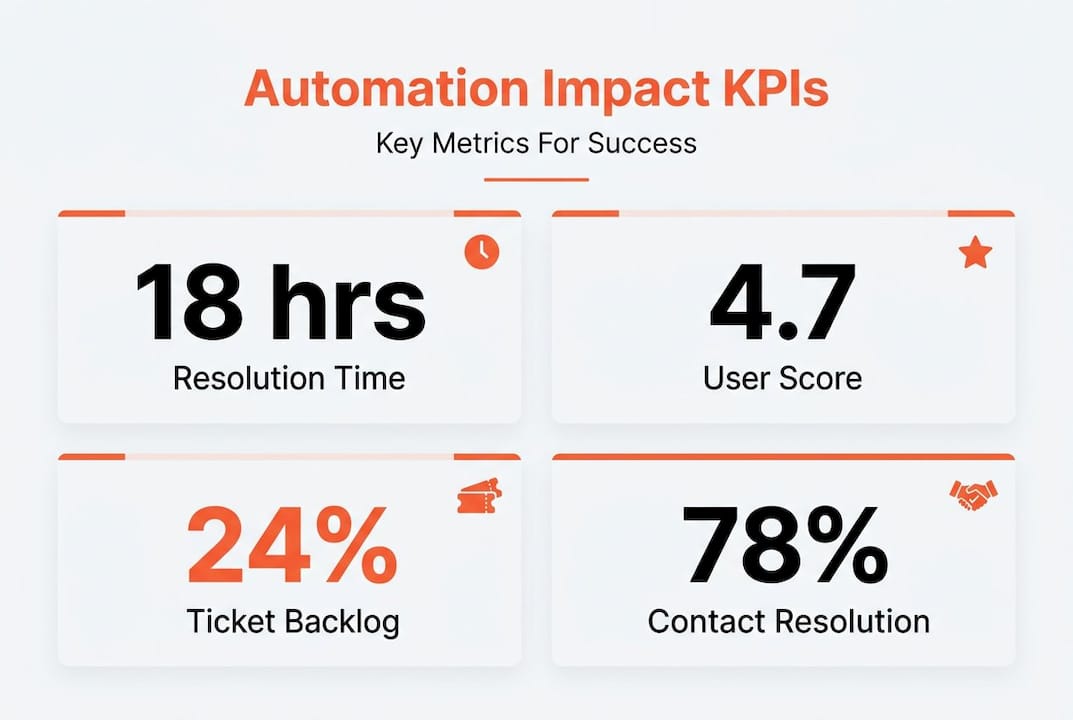
Common signs that your automation is genuinely delivering value include a sustained reduction in ticket backlog, faster resolution times across all priority categories, and unprompted positive feedback from employees about how easy it now is to get support. The benefits of smart lockers for hardware distribution, for example, show up clearly in asset tracking data and in employee satisfaction scores when employees can collect a replacement device at any time without waiting for a technician.
To gather meaningful stakeholder feedback and uncover new improvement areas, use these methods:
- Post-resolution micro-surveys sent automatically after ticket closure (keep them to two or three questions)
- Quarterly focus groups with employees across different sites and roles
- Monthly review meetings between IT leadership and service desk team leads
- Anonymised feedback channels within your self-service portal
- Usage analytics from your automation platform to identify where users are dropping off or abandoning self-service flows
Automation is not a project with a finish line. It is a capability that compounds in value the more deliberately you iterate on it. Organisations that treat their first deployment as the beginning of a continuous improvement cycle consistently outperform those that treat it as a one-off initiative. Build review cycles into your operating rhythm from day one, and your service desk will improve faster than you expect.
Reviewing guidance on improving team productivity through automation can help you frame the ongoing improvement cycle in terms your business leadership will respond to, particularly when it comes to demonstrating compounding ROI over time.
Why most enterprise IT teams underuse automation and what actually works
The steps outlined above are well established. The research is clear. The technology is mature. So why do so many large organisations still have service desks that feel like they belong in 2015?
The honest answer is that most enterprises stop at surface-level automation. They automate password resets, close the project, and declare success. That is not transformation. It is tinkering. Organisations often overlook the full value of intelligent automation in their service desks, settling for marginal gains when compounding improvements are within reach.
The second problem is cultural. IT teams often frame automation purely as a cost-reduction exercise. That framing is limiting and, frankly, it breeds resistance. When you tell your service desk agents that automation is about doing more with fewer people, you have already lost the room. The organisations that get the most from automation are the ones that lead with employee experience, both for the end users being served and for the IT professionals doing the serving.
There is also a tendency to deploy technology because it is available rather than because it solves a specific, measured problem. We have seen enterprises invest in sophisticated AI-driven triage tools while their asset management data is so poor that the automation cannot function reliably. The technology is only as good as the foundation beneath it. Outcomes and metrics must drive every deployment decision, not vendor enthusiasm or internal pressure to appear innovative.
What actually works is a combination of three things: genuine stakeholder engagement before any tooling decisions are made, a relentless focus on user experience as the primary measure of success, and the discipline to iterate rather than declare victory. The enterprises that treat automation as a living programme, not a capital project, are the ones that consistently report both lower support costs and higher employee satisfaction scores. Those two outcomes are not in tension. They reinforce each other when you get the approach right.
Accelerate your service desk transformation with the right partner
To leverage these strategies for your business, partnering with the right provider can make all the difference. Knowing what good looks like is one thing. Having the technology and expertise to deliver it at enterprise scale is another.
Velocity Smart Technology helps large organisations automate device distribution, IT support workflows, and equipment management across distributed workplaces. Our flagship solution, Velocity Smart Collect, is the only ServiceNow-certified smart locker and vending platform built natively on the ServiceNow instance your team already uses. From our Smart IT Support Kiosk that delivers real-time remote support without onsite technicians, to intelligent asset automation that eliminates manual processes entirely, we give IT leaders the tools to deliver measurable, sustained improvements. Explore practical insights and case studies through Automation Unboxed to see how enterprises like yours are transforming their service desks today.
Frequently asked questions
What is the fastest way to improve service desk response times?
Service desk automation rapidly speeds issue resolution by handling routine requests instantly and routing complex tickets to the right agent without manual intervention. Combining automation with self-service options delivers the fastest measurable reduction in average response times.
Which performance metrics should I monitor after automating my service desk?
Key metrics are average resolution time, user satisfaction score, ticket backlog, and first contact resolution rate. KPI tracking is essential to measure automation’s true impact and identify where further improvement is needed.
How do you prevent automation from causing employee resistance?
Involving staff early in the planning and training process helps address concerns before they become obstacles. Stakeholder engagement from the outset builds trust in new systems and significantly improves adoption rates across the organisation.
Can automation enhance employee satisfaction as well as efficiency?
Yes. By automating repetitive, low-value tasks, employees can focus on more complex and rewarding challenges. Automation improves both efficiency and staff engagement when it is deployed with user experience as a primary design consideration.
Recommended
- Efficient IT Support Automation Steps for Enterprises
- The Future of IT Support: From Tech Bars to Intelligent Service Points
- IT Asset Management: Driving Efficiency in Fortune 500 Enterprises
- Using Smart Locker tech to improve your IT Support
- Step-by-step productivity improvement with AI: SMB guide
See what Smart Collect® could save you
Model your savings in two minutes, or book a 60-minute workshop to pressure-test the numbers against your estate.