
How mobile powers smarter enterprise asset management
TL;DR:
- Mobile technology has become a vital link between field operations and central asset management systems, enabling real-time updates and improved operational efficiency. It transforms workflows by allowing instant documentation, GPS tracking, and automated processes, thereby reducing downtime and errors across distributed workplaces. Implementing secure, integrated mobile solutions with strong change management maximizes ROI, enhances decision-making, and supports enterprise asset management’s strategic objectives.
Mobile technology in enterprise asset management is no longer a convenience bolted onto existing processes. It has become the connective tissue between field operations and central systems, and the organisations that treat it as such are pulling ahead fast. Mobile devices now act as an extension of EAM and CMMS workflows, enabling field technicians to access, update, and document asset data in real time, even when offline. This guide examines how large enterprises are harnessing mobile not just for convenience, but for genuine operational efficiency, intelligence, and measurable ROI across distributed workplaces.
Table of Contents
- How mobile transforms enterprise asset management
- Mobile as an operational intelligence layer
- Real-time information access and automation with mobile
- Security and integration: Challenges and best practices
- The uncomfortable truth about mobile asset management
- Transform your asset management with the right mobile solution
- Frequently asked questions
Key Takeaways
| Point | Details |
|---|---|
| Mobile enables real-time data | Technicians use mobile to update and access asset information instantly, even while in the field. |
| Operational intelligence boost | Treating mobility as a data visibility layer uncovers downtime and productivity gaps. |
| Automation streamlines workflows | Mobile solutions automate asset-tracking tasks, reducing errors and response times. |
| Security is essential | Robust mobile integration and security practices are vital for reliable asset management. |
| Workflow change drives ROI | IT and operations must focus on adoption and workflow improvement, not just technology deployment. |
How mobile transforms enterprise asset management
Mobile devices have reshaped what is possible in the field. Where technicians once returned to a desk to log updates, raise work orders, or confirm asset locations, they now handle all of that from wherever they are standing. That shift sounds simple. In practice, it changes everything about how asset data flows through an organisation.
Field-ready mobile asset tools bring EAM and CMMS workflows directly to the point of work, enabling real-time access and updates wherever assets are located. A field engineer inspecting a critical piece of infrastructure can photograph a defect, raise a maintenance request, update the asset record, and alert the relevant team, all in under two minutes, without leaving the site. That same workflow, handled manually, might take several hours and introduce multiple opportunities for error.
The contrast between traditional and mobile-enabled workflows is stark:
| Workflow element | Traditional approach | Mobile-enabled approach |
|---|---|---|
| Asset status update | Return to office, log manually | Update instantly from the field |
| Defect documentation | Written notes, later transcribed | Photos and notes captured on-site |
| Location verification | Periodic audits | Continuous GPS-based updates |
| Work order creation | Email or phone request | Raised directly from mobile device |
| Data accuracy | Prone to transcription errors | Captured at source, synced immediately |
Key advantages that mobile brings to field asset management include:
- Real-time updates to central systems without any manual re-entry
- Offline capability that allows work to continue in areas with poor connectivity, with automatic synchronisation when signal is restored
- GPS-enabled location tagging that keeps asset records accurate without periodic manual audits
- Photo and video documentation attached directly to asset records for clearer maintenance histories
- Instant work order creation from wherever an issue is identified
Large field crews managing assets across multiple sites, whether in aerospace, utilities, or healthcare, have found that tablets and smartphones reduce the cycle time from issue identification to resolution significantly. One practical example: a maintenance technician managing a portfolio of medical equipment across several hospital wings can now complete full inspection rounds and submit documented reports before leaving the building, rather than processing paperwork back at a service desk.
Pro Tip: Standardise your field data capture forms within your mobile platform from day one. Consistent data entry templates reduce errors, make reporting easier, and significantly speed up the transition to mobile-first workflows. When everyone captures information in the same format, your analytics become immediately more useful.
Improving efficiency in enterprise IT asset management begins at the data capture stage. If field teams are capturing clean, structured data in real time, every downstream process from maintenance scheduling to procurement decisions benefits. The integration of electronic lockers into this ecosystem adds another layer, allowing devices and equipment to be collected, returned, and tracked automatically without manual intervention.
Mobile as an operational intelligence layer
The field efficiency gains are compelling. But the more strategic shift happening in large enterprises is the recognition that mobile is not just a set of devices. It is a data collection and intelligence layer that feeds directly into operational decision-making.

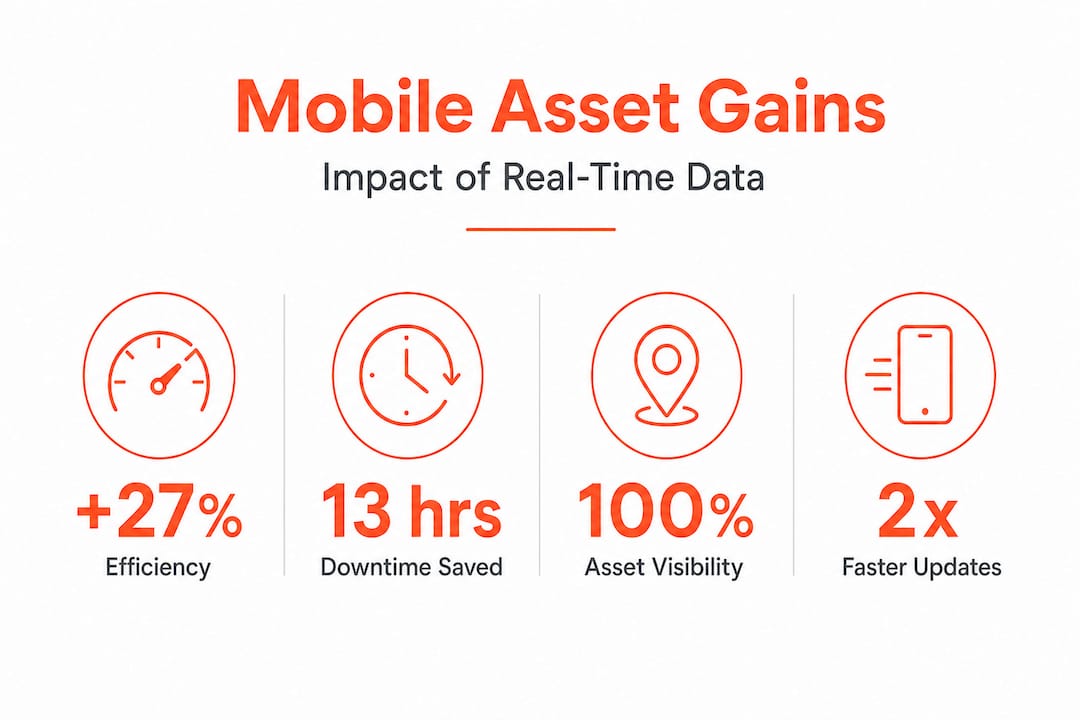
Frontline workers lose an estimated 13 hours per person each month to mobile device downtime, impacting productivity in ways that ripple across entire operations. Multiply that figure across a workforce of several hundred technicians and the cumulative loss becomes a serious business case for treating mobile infrastructure as mission-critical rather than peripheral.
The operational intelligence that mobile platforms generate goes well beyond tracking where assets are. Consider the following categories of insight:
| Intelligence type | What it reveals | Operational impact |
|---|---|---|
| Asset utilisation patterns | Which assets are over or underused | Informs reallocation and procurement |
| Downtime frequency | Assets with recurring failures | Triggers preventive maintenance strategies |
| Response time data | How quickly teams address issues | Identifies bottlenecks in support workflows |
| Location data | Asset movement across sites | Prevents loss and enables better planning |
| Technician activity | Task completion rates and timelines | Supports workforce planning decisions |
Enterprises integrating mobility as an intelligence layer are starting to use this data proactively. Rather than responding to failures, they are identifying patterns that predict failures before they occur. That is a significant shift in operational posture, from reactive to genuinely preventive.
Reducing downtime is one of the most tangible outcomes of treating mobile seriously as an intelligence platform. When asset health data flows in real time from the field to central dashboards, operations managers can see emerging problems and respond before they escalate. Automating device returns through smart locker systems complements this by ensuring device availability data is always current, eliminating the uncertainty that leads to procurement overspending.
Real-time information access and automation with mobile
With the intelligence-gathering capacity of mobile established, the practical mechanics of how information flows from the field to management systems become critical. The speed and accuracy of that flow determine how useful the data actually is.
Here is how a well-designed mobile asset update workflow operates:
- Technician identifies an issue or completes a task at the asset location, whether that is a broken component, a completed inspection, or a device that needs replacing.
- Mobile device captures structured data including photographs, GPS location, condition rating, and any relevant notes, all within a standardised form in the mobile app.
- Data syncs instantly to the central asset management system, creating or updating a record in real time without any manual intervention from office staff.
- Automated workflows trigger based on the update. A maintenance request might be raised, a parts order initiated, or a notification sent to the relevant team manager.
- Dashboards and reports update immediately, giving operations managers current visibility into asset status across all sites.
- Follow-up tasks are assigned automatically to the appropriate team, with deadlines and priority levels set by the system based on asset criticality.
As one industry perspective on field-ready mobile asset tools puts it, technicians use mobile devices to update asset locations, capture inspections and notes, and document changes instantly within asset management systems. That immediacy is what separates reactive maintenance programmes from genuinely proactive ones.
The types of data that mobile devices handle across the asset lifecycle include:
- Scheduled and unscheduled inspection records
- Incident reports with photographic evidence
- Parts and consumables requests
- Asset location updates via GPS
- Device configuration and health diagnostics
- Employee equipment requests and returns
“When field data reaches the management system in seconds rather than hours, the gap between operational reality and recorded data effectively disappears. That is when asset management stops being an administrative function and starts being a strategic one.”
Digital lockers in IT asset management extend this automation into the physical layer, allowing employees to collect and return devices autonomously. Combined with centralised asset tracking, the result is a closed loop where physical asset movements and digital records stay perfectly synchronised without any manual effort.
Pro Tip: Configure location-aware alerts within your mobile asset platform to notify technicians of assets requiring attention when they are physically nearby. This approach to proactive maintenance reduces travel time and allows issues to be addressed as part of existing site visits rather than as separate call-outs, saving both time and cost.
Security and integration: Challenges and best practices
The operational case for mobile in asset management is strong. The deployment challenges, however, are real and should not be underestimated. For IT leaders, the two most consequential concerns are security and integration.
Mobile asset management initiatives introduce new attack surfaces. Devices in the field connect to a range of networks, handle sensitive operational data, and are often shared between multiple users. Without deliberate security architecture, these characteristics create meaningful risk.
Common pitfalls in mobile asset management deployments include:
- Integration gaps between mobile tools and existing EAM or CMMS platforms, creating data silos where field data never reaches central records
- Inconsistent authentication, particularly where devices are shared and personal account policies are not enforced
- Unencrypted data transmission over public or unmanaged Wi-Fi networks at remote sites
- Shadow BYOD usage, where employees use personal devices to access asset systems without any management controls applied
- Poor offline handling, where data captured without connectivity is lost or corrupted rather than queued for synchronisation
Understanding BYOD security risks is essential for any IT leader deploying mobile asset tools across a large workforce. Bring-your-own-device policies can extend the reach of mobile programmes quickly and at low cost, but only if the security controls applied to managed devices are replicated through mobile device management platforms.
Mobile asset management initiatives succeed when device security, offline access, and seamless workflow integration are prioritised from the outset. The organisations that get this right share a common approach: they treat mobile deployment as an IT infrastructure project, not a software rollout. That distinction matters enormously.
Best practices for secure, integrated mobile asset management:
- Implement a mobile device management platform to enforce encryption, remote wipe, and policy compliance across all enrolled devices
- Require multi-factor authentication for access to asset management systems, especially for shared devices
- Establish clear data classification policies so field teams know what information can be stored locally and what must remain in the central system
- Audit mobile asset data flows quarterly to identify vulnerabilities, shadow data stores, and integration failures before they become serious problems
- Ensure your mobile platform has a tested offline mode with automatic synchronisation and conflict resolution built in
The importance of asset tracking as a foundational discipline cannot be overstated here. Security and tracking are intertwined: knowing where every device is, who has it, and what it is accessing is as much a security function as an operational one.
Pro Tip: Run a data flow audit before going live with any mobile asset platform. Map every point where data leaves a device, travels across a network, or enters a central system. This exercise almost always reveals unexpected vulnerabilities and integration assumptions that would otherwise become expensive problems in production.
The uncomfortable truth about mobile asset management
Having explored the strategies and best practices, there is a harder conversation worth having. Most mobile asset management initiatives that underdeliver do not fail because of the technology. They fail because of how the technology is implemented, adopted, and supported.
The most common mistake is treating mobile deployment as a technology problem with a technology solution. In reality, the hardest part is changing how people work. Field technicians who have used paper-based or desktop-based processes for years do not automatically embrace mobile workflows, even when the tools are genuinely better. Without deliberate change management, training, and visible leadership support, adoption stalls and the technology sits underused.
The most overlooked ROI lever in mobile asset management is not device tracking or maintenance scheduling. It is real-time visibility into asset health and location across the entire estate. Most organisations focus on the direct efficiency gains, which are real. Fewer focus on the decision quality improvements that come from always-accurate asset data. When operations managers can trust their dashboards, they make faster, better decisions. That is where the compounding value lives.
Early deployments often underestimate two things: the complexity of offline requirements in locations with poor connectivity, and the volume of training and support that field teams actually need. Both of these are fixable problems, but they require budget and planning from the start rather than as afterthoughts.
The organisations that extract genuine value from mobile asset management share one characteristic: they invest in supporting the remote and distributed workforce as seriously as they invest in the technology itself. The tools create the capability. People and processes determine whether that capability translates into results.
For IT leaders looking to accelerate real outcomes, the actionable wisdom is this: pilot your mobile deployment on a single team or site, measure adoption and data quality rigorously, learn what is not working before you scale, and treat frontline feedback as your most valuable input. Technology decisions made without that feedback tend to be expensive.
Transform your asset management with the right mobile solution
The shift from manual, office-bound asset management to real-time, mobile-led operations is one of the most significant efficiency improvements available to large enterprises today. The benefits, including reduced downtime, improved data accuracy, smarter maintenance, and stronger security, are all achievable. What they require is the right foundation.
Velocity Smart Technology builds that foundation. Our mobile automation solutions connect field operations, device management, and IT workflows into a single, cohesive system that runs natively within ServiceNow, eliminating data silos and manual re-entry entirely. Our smart IT support kiosks enable employees to troubleshoot, replace, and collect devices without waiting for a technician, while our smart locker and vending platform automates equipment distribution across multiple sites. If you are ready to build a mobile asset management strategy that delivers measurable results, we are ready to help you do it.
Frequently asked questions
How does mobile reduce downtime in asset management?
Mobile systems enable field technicians to identify and resolve asset issues immediately at the point of work, and technicians can execute tasks and capture data in real time, cutting the delay between issue detection and resolution significantly.
What is the main benefit of using mobile for asset tracking?
Mobile technology ensures real-time asset visibility, with field crews tracking assets via GPS and capturing live documentation, which reduces errors and keeps location records accurate without manual audits.
How much productivity is lost due to mobile device downtime?
Frontline employees lose 13 hours per person per month to mobile device downtime, making reliable mobile infrastructure a direct productivity imperative rather than a secondary concern.
How can enterprises keep mobile asset systems secure?
Adopt mobile device management, enforce multi-factor authentication, encrypt all data transmissions, and conduct regular audits of data flows to identify and address vulnerabilities before they create operational or compliance risk.
Do mobile tools support offline operations in asset management?
Yes. Modern platforms allow field teams to work offline and capture data without connectivity, with automatic synchronisation to central systems once network access is restored.
Recommended
See what Smart Collect® could save you
Model your savings in two minutes, or book a 60-minute workshop to pressure-test the numbers against your estate.