
Enterprise IT: 6 questions to secure managed services accountability
Managed services in the IT industry mean paying a third-party provider a recurring fee to proactively monitor, maintain, and take contractual responsibility for defined IT systems, rather than calling someone only when something breaks. The provider, known as a managed service provider (MSP), commits to measurable outcomes through a service-level agreement (SLA), using remote monitoring and management (RMM) tools to catch problems before they become outages. The result organisations actually buy is predictability: fixed monthly costs and a named party accountable when systems fail.
TL;DR:
- Contracts should specify clear SLA targets for response and resolution times, with penalties for non-compliance to ensure accountability.
- Native integration with existing ITSM systems like ServiceNow is crucial to avoid data silos and ensure auditability of asset and incident records.
- On-site hardware support, including device replacements and kit delivery, must be explicitly included in the contract to prevent operational gaps.
- Pricing models vary from per-device to tiered packages; vendors often include hidden costs like on-site surcharges or transition fees that need careful review.
- Verifying real-time reporting and audit access is essential, as opaque reports hinder SLA enforcement and may mask performance issues.
Table of Contents
- What is managed IT services, and how did the model evolve?
- How do managed services work day to day?
- What services fall under a typical managed IT contract?
- How much do managed IT services cost, and what should the contract cover?
- What are the real benefits of managed IT services?
- Where do managed services fall short?
- What questions should you ask before signing with an MSP?
- Why native ServiceNow integration changes the accountability equation
- Where to verify the details
- Bringing hardware handovers under the same accountability standard
- Sources
What is managed IT services, and how did the model evolve?
The MSP definition hinges on one word: accountability. A managed service provider does not just sell you software or send an engineer when you call. It contractually assumes ongoing responsibility for the health of a defined set of systems, and it gets paid whether or not anything goes wrong that month. That inversion of incentive, from paid-per-incident to paid-to-prevent-incidents, is what separates managed services from the break/fix model that dominated IT support through the 1990s and early 2000s.
The history matters because it explains why the category looks the way it does today. Application service providers (ASPs) in the late 1990s hosted software remotely but rarely took responsibility for the underlying infrastructure. As RMM tooling matured through the 2000s, providers gained the ability to watch thousands of endpoints simultaneously and patch or remediate issues before a user even noticed. That capability, combined with subscription pricing, created the modern MSP. Cloud computing then added another layer: providers had to extend monitoring and governance across hybrid environments rather than just on-premises servers, since cloud adoption shifted MSP work toward identity, configuration and governance rather than eliminating the need for management.
It is worth drawing a hard line between MSPs and the infrastructure and platform providers many people lump in with them:
- Platform providers (IaaS/PaaS) sell compute, storage, and networking capacity but leave day-to-day operational management, patching, and monitoring to the customer.
- MSPs accept SLA-bound accountability for uptime, security posture, and system health, whether the underlying infrastructure sits on-premises, in the cloud, or across both.
- The dividing line is who answers for a failure at 3am: the platform vendor’s terms of service almost never promise that; an MSP’s SLA does.
This distinction, detailed by Red Hat, is the single most useful filter for evaluating a vendor’s pitch. If a provider’s contract does not name specific accountability terms, you are buying tools, not managed services.
How do managed services work day to day?
Two platforms sit underneath almost every MSP engagement: RMM software for technical monitoring and PSA (professional services automation) software for ticketing, asset tracking, and billing. RMM and PSA tools form the operational backbone that lets a single technician oversee thousands of endpoints without physically visiting each one. Without them, the “proactive” claim in most MSP marketing collapses into reactive support with a subscription invoice attached.
The operational workflow generally follows a consistent sequence:
- Monitoring — RMM agents installed on endpoints and network devices report performance metrics, security events, and error states continuously.
- Triage — Alerts route into a PSA ticketing queue, where automated rules prioritise based on severity and affected systems.
- Patching and remediation — Routine fixes, software updates, and security patches deploy automatically or semi-automatically during defined maintenance windows.
- Escalation — Issues that RMM tooling cannot resolve escalate to a human technician, following an SLA-defined response time tied to severity tier.
- Reporting — Monthly or quarterly reports document uptime, tickets resolved, patch compliance, and SLA adherence, giving the customer auditable proof of performance.
That last step is where most of the real value gets tested. An SLA is only as good as the reporting and audit access behind it. If a provider cannot show you patch compliance rates, mean time to resolution, or uptime logs on demand, the SLA is effectively unenforceable. TSIA’s research on managed services frames this well: the strongest engagements are structured as shared-outcome partnerships with reporting built into the operational rhythm, not vendor relationships where reporting is an afterthought requested once a year.
Pro Tip: Ask a prospective MSP to show you a real, anonymised monthly report from an existing client before you sign anything. If they cannot produce one quickly, their reporting infrastructure is likely thinner than their sales deck suggests.
What services fall under a typical managed IT contract?
Managed services in the IT industry rarely mean one uniform package. Providers typically build tiered offerings, and understanding the common categories helps you map your organisation’s actual gaps to what a vendor is proposing, rather than buying whatever tier is easiest to sell.
- Network and infrastructure monitoring covers routers, switches, firewalls, and servers, with alerts for performance degradation or outages before end users notice.
- Help desk and end-user support handles password resets, software issues, and desktop troubleshooting, usually tiered by response time (critical issues in minutes, low-priority requests within a business day).
- Managed security services include threat detection, vulnerability scanning, patch management, and often extend into business continuity and disaster recovery (BCDR) planning and testing.
- Managed cloud infrastructure covers provisioning, cost optimisation, and governance across AWS, Azure, or Google Cloud environments, plus application and platform management for specific software stacks.
- Specialised services address narrower needs: managed print services, managed database administration, and vertical-specific offerings for healthcare compliance, financial services regulation, or legal document management.
Industry taxonomy from TechTarget confirms network monitoring, help desk, patching, and cybersecurity as the core tiers most contracts build from. What that taxonomy does not always spell out clearly is scope boundaries. A “managed help desk” contract that covers software troubleshooting but excludes hardware handovers, device swaps, or peripheral distribution leaves a physical fulfilment gap that surfaces the first time hardware fails or a new starter needs kit promptly. CGI’s overview of managed services notes that proactive monitoring, cybersecurity, and cloud transition assistance are commonly bundled, but physical fulfilment logistics rarely make the standard menu. That gap becomes a genuine operational headache once you scale support across dozens of sites, a topic worth reading about in how enterprises automate device distribution.
How much do managed IT services cost, and what should the contract cover?
Pricing structures generally fall into four models: per-device (a flat rate for every monitored endpoint), per-user (a rate covering all of one employee’s devices), flat-rate all-inclusive (one fee regardless of ticket volume or device count), and tiered (bronze/silver/gold packages with escalating scope). TechTarget’s analysis confirms these as the industry-standard structures, and the choice between them usually comes down to how predictable your device and headcount growth is.

Two documents define what you are actually buying: the Master Services Agreement (MSA), which sets the overall legal and commercial terms, and the SLA, which specifies performance commitments, response times, and penalties for missed targets. The shift to subscription-based pricing exists precisely to stabilise costs for both provider and customer, but that stability only holds if the contract’s fine print does not undo it.
Watch for these cost traps before signing:
- On-site labour surcharges billed separately from the base monthly fee for any visit requiring a technician on-premises.
- Third-party licence pass-through costs for security tools or backup software the MSP requires but does not include in the headline price.
- Transition and onboarding fees that can run into tens of thousands for larger environments, often disclosed only during final contract review.
One procurement mistake shows up more often than any other in vendor evaluations: buyers anchor on the lowest monthly fee and treat the SLA as boilerplate. Yet analysts identify weak SLA terms and opaque reporting, not price, as the real source of buyer’s remorse once contracts are a year old. The SLA is your legal leverage; a cheap contract with soft SLA language costs more in unresolved downtime than a pricier one with enforceable terms.
What are the real benefits of managed IT services?
The most cited benefit is predictable budgeting. A subscription model that turns unpredictable break/fix billing into flat monthly recurring revenue benefits both sides: providers get stable cash flow, and your finance team gets an IT line item that does not swing wildly month to month. For CIOs building multi-year budgets, that predictability alone often justifies the switch from ad-hoc support.
Beyond cost, managed services solve a skills problem most internal IT teams cannot solve alone. Cybersecurity expertise, cloud architecture knowledge, and 24/7 monitoring coverage all require either a large internal team or a specialist partner. Few mid-sized organisations can justify staffing a round-the-clock security operations centre in-house, but an MSP can spread that cost across dozens of clients.
Managed services tend to deliver the strongest return in specific scenarios:
- Rapid scaling — opening new offices or onboarding large headcount increases without proportionally growing internal IT staff.
- Regulatory compliance — industries like healthcare and financial services need documented, auditable security and continuity processes that a specialist provider maintains more consistently than a generalist internal team.
- Specialist gap-filling — covering niche skills (network security, database administration) without a full-time hire for a narrow function.
TSIA’s guidance reinforces that the organisations getting the most value treat the MSP relationship as an extension of their own team, measuring shared outcomes rather than just counting closed tickets.
Where do managed services fall short?
The most common failure mode is integration friction. Proprietary RMM stacks create data silos that force IT teams to maintain a duplicate CMDB alongside their existing ServiceNow or ITSM records, doubling the reconciliation work every audit cycle. TechTarget’s research flags this walled-garden problem as one of the more persistent complaints from enterprise buyers.
A second, quieter risk is scope ambiguity around physical support. Remote monitoring does not guarantee that a broken laptop gets physically replaced or that a new starter’s kit arrives on day one. Contracts should explicitly state whether “managed” includes on-site device handovers, because the gap between remote monitoring and physical fulfilment is where hidden costs and employee frustration both accumulate. This is exactly the exposure worth reviewing in a broader look at scaling IT support across distributed locations.
- Vendor lock-in through proprietary tooling that makes switching providers costly.
- Opaque reporting that makes SLA compliance impossible to verify independently.
- Weak escalation paths with no named contact for issues that fall outside standard categories.
Pro Tip: During contract negotiation, ask specifically who dispatches a technician for a hardware failure, how fast, and at what additional cost. If the answer is vague, treat it as a red flag, not a detail to sort out later.
What questions should you ask before signing with an MSP?
Selecting a managed service provider is a procurement exercise with real financial and security consequences, so a structured evaluation beats a gut-feel decision every time. Work through these questions during shortlisting:
- What are the exact SLA targets for uptime, response time, and resolution time by severity tier, and what penalties apply if they are missed?
- Do you provide direct reporting and audit access, or only summary dashboards controlled entirely by your team?
- Does your platform integrate natively with our existing ITSM/CMDB, or does it require a separate portal and manual reconciliation?
- What security certifications do you hold (ISO 27001, SOC 2), and can you provide current audit evidence?
- Who owns the data, and what is the exit process if we terminate the contract?
- What is your on-site response time for hardware issues, and is it included in the base fee or billed separately?
| Evaluation area | What to ask for | Red flag |
|---|---|---|
| SLA transparency | Named response/resolution times by severity | Vague language like “best effort” |
| Reporting access | Real-time or self-serve audit dashboards | Reports only on request, delayed |
| ITSM/CMDB integration | Native sync, no duplicate asset registry | Separate vendor portal required |
| Security posture | Current ISO 27001 or SOC 2 certificates | Certifications “in progress” indefinitely |
| Physical support scope | Written on-site response commitments | Physical handovers excluded or unclear |
A vendor that hesitates on data ownership or audit access questions is telling you something important before the contract is even signed.
Why native ServiceNow integration changes the accountability equation
Duplicate CMDBs are not a minor annoyance. Every asset record maintained in a separate MSP portal is a second source of truth your audit team has to reconcile against your actual ServiceNow instance, and every reconciliation gap is a compliance risk during a security review.
Native integration means an MSP’s monitoring and fulfilment data lives inside the customer’s own ServiceNow tenant, inheriting existing RBAC, audit trails, and CMDB records rather than syncing from a separate vendor database. That distinction determines whether your audit team is reviewing one system of record or reconciling two.
A practical RFP clause worth adopting requires any MSP to write asset and incident records directly into your CMDB with read/write audit logs, not a proprietary equivalent. When physical fulfilment providers like Smart Collect® from Velocity-smart run natively inside a customer’s ServiceNow tenant, that same principle extends to hardware handovers: locker transactions, loan records, and equipment returns post as native CMDB entries, not synced copies. Demand three phrases in every RFP: native integration, audit access, CMDB synchronisation.
Where to verify the details
For readers who want to check the definitions and figures cited here directly, the Wikipedia overview of managed services covers the model’s history and pricing logic. TechTarget’s managed IT service and MSP definitions detail tooling and tiering. TSIA’s managed services overview covers the partnership framing referenced above.
Bringing hardware handovers under the same accountability standard
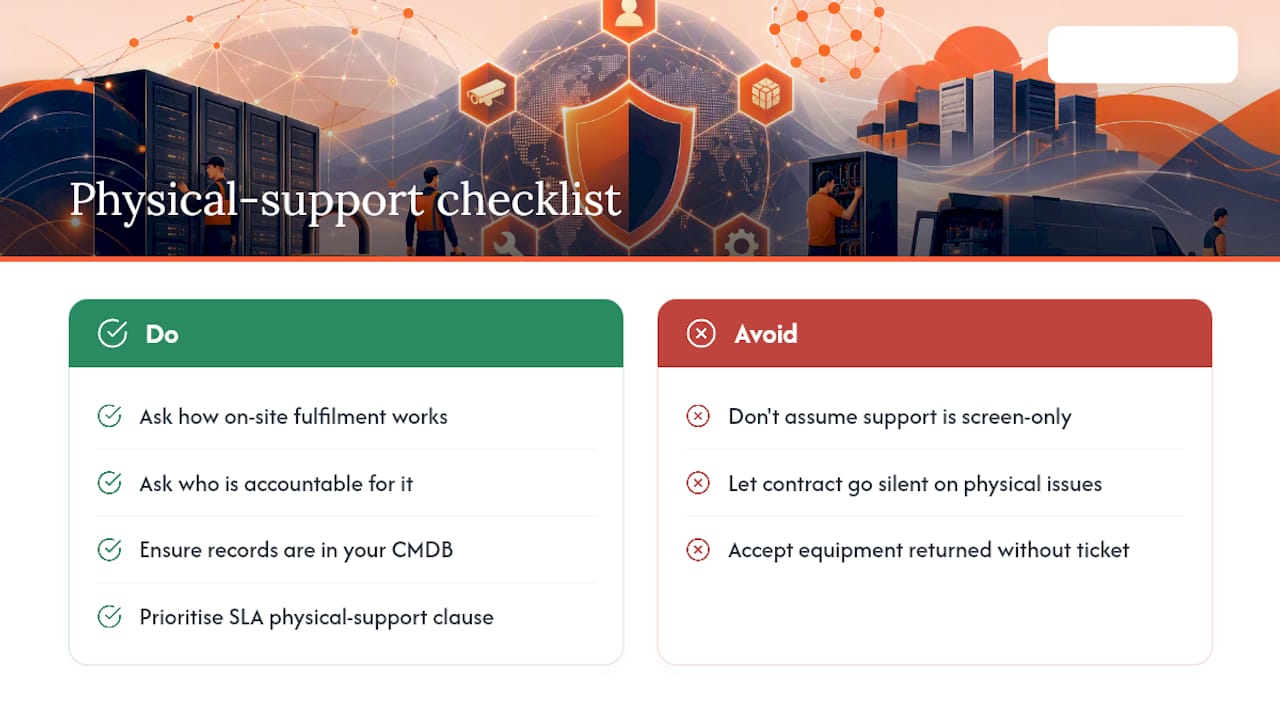
The conventional advice on managed services stops short too often. Most explainers cover SLAs, pricing tiers, and reporting cadences, then treat “IT support” as if it only ever happens through a screen. It does not. Every organisation running managed services eventually hits the moment a laptop needs physically replacing, a new starter needs kit before their first meeting, or a departing employee needs to return equipment without a ticket sitting open for three weeks.
That is the gap this explainer has tried to be honest about. Accountability under an SLA means nothing if the contract goes silent the moment a problem requires a human to touch a physical device. If you take one thing from this away from your next MSP negotiation, make it this: ask exactly how on-site fulfilment works, who is accountable for it, and whether the records live in your CMDB or someone else’s portal. For readers weighing whether to extend that accountability to physical fulfilment themselves, how enterprises are automating IT self-service hardware is worth a closer look, alongside providers like Ventis Consulting’s comparison of managed services versus outsourcing for a broader procurement lens. Prioritise the SLA’s physical-support clause first. Everything else in the contract is easier to fix later.
— Anthony
Sources
- Managed services — Wikipedia
- What Is a Managed IT Service? — SearchITChannel (TechTarget)
- What are Managed Services? Definition and Overview — TSIA
- Gain a deeper understanding of what managed services providers bring to the table — CGI
Recommended
See what Smart Collect® could save you
Model your savings in two minutes, or book a 60-minute workshop to pressure-test the numbers against your estate.